On this page▾
Tesla announced Apple CarPlay in May 2026, but the rollout is delayed and no Tesla on the road ships with it as of September 2026. Cars built before 2024 likely never get native CarPlay. Until then, a mounted iPhone or a hardware adapter gives you CarPlay today.
I mounted an iPhone 15 in a 2022 Model Y and looked for a CarPlay tile on Tesla's own screen. There isn't one, and no update added it. So I ran the phone as a second dashboard instead. That is the honest state in 2026: the announcement is real, the shipping product is not.
Why Tesla CarPlay is delayed
Tesla spent years keeping drivers inside its own full-screen interface. The May 2026 announcement was a reversal — a planned windowed CarPlay panel, not a full-screen takeover. That is the first reason the wait feels long: Tesla is fitting CarPlay into a UI it never designed for it.
The bigger reason is hardware. Tesla named only recent Hardware-4 cars for the feature:
- Model 3 Highland (2024 and newer)
- Model Y Juniper (2025 and newer)
- Cybertruck
Pre-2024 Teslas likely never get native CarPlay. As of June 2026 there was no firm ship date, and by September that had not changed. If you drive a 2019 Model 3 or a 2021 Model Y, waiting is not a plan. Pick a workaround and treat it as permanent.
Build your CarPlay
Get a CarPlay-style dashboard in your Tesla today
Mount Mode in Car Play Connect turns your iPhone into a driver dashboard — Apple Maps, hands-free calls, and a GPS speedometer in mph or km/h. No Tesla modification. Free to try on iOS 16.3+.

Car Play Connect: Auto Sync
4.6·2,735+ ratings·Free


The 30-second test
Before you buy anything, confirm where your Tesla actually stands. It takes half a minute, parked.
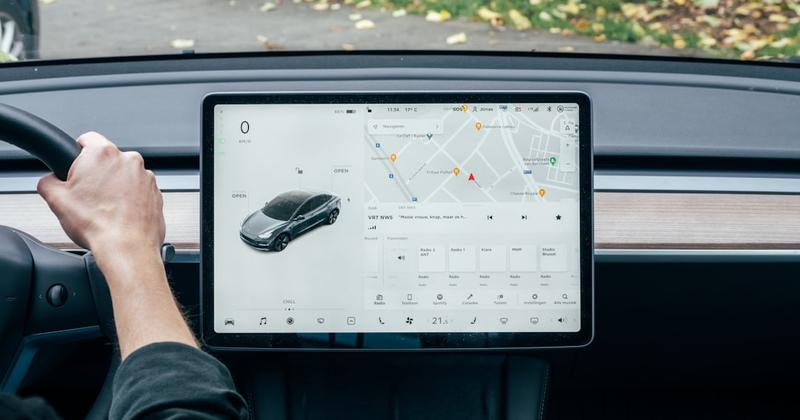
- Wake the center screen and open the app launcher.
- Look for an Apple CarPlay tile. There won't be one — no Tesla ships it yet.
- Check whether your car has the built-in web browser. Adapters need it.
- Note your model year. 2024+ Hardware-4 cars are the only ones in Tesla's CarPlay plan.
That tells you which of the three paths below fits. Older car with a browser? Adapter or Mount Mode. New Hardware-4 car? You can wait, but you still have nothing today.
Method 1: Use Mount Mode for a CarPlay dashboard today
Mount Mode is the free path, and it works on every Tesla — any model, any year. It does not touch the Tesla screen. Instead your iPhone becomes a second, driver-facing dashboard. This is what I use in the 2022 Model Y.
- Mount the iPhone where your eyes drop naturally, then plug it in.
- Open Car Play Connect Mount Mode and pick maps.
- Get a large GPS speedometer, day/night auto-switching, and mph or km/h.
- Use tap-without-looking buttons for volume, next track, and end call.
- Route audio through the car with CarKit Bluetooth so calls stay hands-free.
When it falls short: the car's own screen still runs Tesla's interface, so this is a companion, not a replacement. You glance at the phone for Apple Maps and synced lyrics; the Tesla screen keeps climate and controls. For most owners that split is enough, and it costs nothing to test.
Method 2: Add a hardware CarPlay adapter
Want the real CarPlay interface on the Tesla display? A hardware adapter is the only route, and it costs $129–$199. Brands like Carlinkit Tesla and Tesery route CarPlay through Tesla's built-in browser.
- Confirm your Tesla has the web browser first — no browser, no adapter.
- Plug the adapter in and open the browser window it feeds CarPlay into.
- Connect your iPhone and use CarPlay apps inside that panel.
The honest caveats matter here. The adapter disrupts cabin aesthetics and can affect resale value. It voids nothing officially, but Tesla has pushed firmware that broke similar workarounds before. If a smooth, unmodified cabin matters to you, Method 1 is the safer bet.
Build your CarPlay
More than a dashboard: widgets, lyrics, and a startup sound
While native CarPlay is delayed, Car Play Connect adds weather cards, air-quality tiles, synced lyrics, and a custom connection sound to your setup. Annual plan $19.99/year.
Car Play Connect: Auto Sync
Free
Method 3: Wait for official Tesla CarPlay
Waiting is only rational for one group: drivers of a 2024+ Hardware-4 Tesla. That means a Model 3 Highland, a Model Y Juniper, or a Cybertruck. Everyone else should skip this method entirely.
- Keep your car's software updated so you don't miss the feature drop.
- Track Apple's official CarPlay vehicle list — Tesla appearing there is the real signal.
- Expect a windowed panel, not a full-screen CarPlay takeover.
The reality check: there is no firm ship date, and the plan excludes every pre-2024 Tesla. Even a 2026 Model Y owner has nothing usable today. So even if you qualify, run Mount Mode or an adapter in the meantime rather than driving with the stock setup.
Tesla CarPlay options compared
| Option | Cost | Works on | Best for |
|---|---|---|---|
| Mount Mode (Car Play Connect) | Free to try · $19.99/year | Every Tesla, any year | Anyone who wants CarPlay-style maps and calls now |
| Hardware adapter (Carlinkit, Tesery) | $129–$199 | Teslas with the built-in browser | Drivers who want the real CarPlay UI on the Tesla screen |
| Wait for official CarPlay | Free (when it ships) | 2024+ Hardware-4 Model 3 / Y, Cybertruck | New-Tesla owners who can wait with no set date |
Frequently Asked Questions
Is Apple CarPlay coming to Tesla?
Tesla announced Apple CarPlay support in May 2026, so it is officially coming — but only to some cars. The plan is a windowed CarPlay panel limited to recent Hardware-4 models: Model 3 Highland (2024+), Model Y Juniper (2025+), and Cybertruck. Pre-2024 Teslas likely never get native CarPlay. There is no firm ship date yet.
When will Tesla get Apple CarPlay?
No firm date has been set. Tesla announced CarPlay in May 2026, but as of September 2026 the rollout is delayed and no Tesla ships with it. Even when it arrives, it is planned only for Hardware-4 cars built from 2024 on. Older Teslas should plan for a permanent workaround instead of waiting.
Do Teslas have Apple CarPlay in 2026?
No Tesla on the road today ships with native Apple CarPlay. Tesla does not appear on Apple's official CarPlay vehicle list. If you want CarPlay-style navigation, music, and calls in a Tesla right now, use a mounted iPhone with Mount Mode or route CarPlay through a hardware adapter and the car's built-in browser.
Does the 2026 Tesla Model Y have Apple CarPlay?
Not out of the box. A 2026 Model Y (Juniper, Hardware-4) is in the group Tesla named for the future windowed CarPlay panel, but the feature has not shipped and has no firm date. Until it does, even a brand-new Model Y needs Mount Mode or a hardware adapter for CarPlay.
Can I add Apple CarPlay to my Tesla now?
Yes, with a workaround, not a factory update. Two paths work today: Mount Mode turns an iPhone into a CarPlay-style dashboard on any Tesla, and a hardware adapter ($129–$199) routes CarPlay through Tesla's built-in browser. Neither adds native CarPlay to the main Tesla screen, but both give you the CarPlay apps you want.
Why is Tesla CarPlay taking so long?
Tesla built its own full-screen interface and long resisted CarPlay to keep drivers inside that system. The May 2026 announcement was a reversal, but it needs Hardware-4 compute and new software, so older cars are excluded. That hardware split, plus no committed release date, is why the rollout feels stalled.
Related guides
- Mount Mode for Tesla and older cars — turn an iPhone into a CarPlay-style dashboard.
- CarPlay widgets for iOS 26 — weather, clocks, and battery tiles for your screen.
- Dynamic Lyrics for CarPlay — synced, karaoke-style lines on the drive.
- Custom CarPlay startup sound — replace the default connection chime.