 Add Car Widgets
How to get lyrics
on CarPlay (iOS 26).
To show synced lyrics on CarPlay, install Car Play Connect, enable Dynamic Lyrics in the CarPlay widget stack, and play any time-coded track on Apple Music or Spotify. The active line highlights as the song plays. For Teslas and pre-2016 cars (no native CarPlay), lyrics also run on the iPhone lock screen with the same sync.
Spotify CarPlay lyrics support in 2026: Spotify still shows lyrics only inside its iPhone app and does not mirror them to the CarPlay screen. The Dynamic Lyrics widget bridges that gap — it reads Spotify's Now Playing data and renders the same synced, karaoke-style lines on CarPlay.
Updated July 2026 for iOS 26.2. Works on any iPhone running iOS 16.2+; full Live Activities sync requires iOS 26.0+.

How to put lyrics on Apple CarPlay (5 steps).
The native Music app shows lyrics on CarPlay in iOS 26 as a static card. To add the karaoke-style active-line highlight, follow these five steps.
- Step 1: Install Car Play ConnectInstall from the App Store and grant it access to the CarPlay widget surface (Settings → CarPlay → your car → Widgets → toggle on).
- Step 2: Choose your music sourcesOpen the app, tap Dynamic Lyrics, and choose your music sources — Apple Music, Spotify, or both. Authenticate once.
- Step 3: Enable Live ActivitiesOpen Settings → Music → Notifications → Live Activities and toggle on. This lets the lyrics card mirror to CarPlay in real time.
- Step 4: Reconnect CarPlayUnplug and replug, or toggle wireless off and back on. The Dynamic Lyrics widget appears in the right pane of the CarPlay screen.
- Step 5: Play any time-coded trackThe great majority of Apple Music tracks have time-coded data; Spotify supports it broadly. The active line highlights automatically.
Not seeing the highlight?If lyrics stay static or don't appear after these steps, work through dynamic lyrics on CarPlay not working — the fix is almost always one of five things, in that order.
No CarPlay in your car? On a Tesla or a pre-2016 vehicle, you can still read the same active-line lyrics on the iPhone screen — mount the phone, hit play, and follow along. No CarPlay needed.
Same active-line logic. Two screens that matter.
Front-row, all the time.
Lyrics fill the right pane of the CarPlay screen. The active line sits in the centre, bigger and brighter; the line you just finished fades. The line coming next is dimmer, waiting. No tap-to-scroll, no fishing for the phone.

For when the car has no CarPlay.
Mount your phone, hit play, lock the screen. Dynamic Lyrics keeps running with the same active-line highlight. Works for Tesla owners, motorcycle riders, and anyone pre-2016 whose car never got CarPlay.

The details that make it feel right.
Sync you can trust, a reading window you control, and everything else tuned for a screen you only glance at.
Time-coded sync
Lines highlight on the beat, pulled from the same time-stamped data Apple Music and Spotify use. The timing isn't a guess.
Karaoke window
Choose how many lines show at once — one for minimalists, three for sing-along passengers, five for the chorus people.
Customizable look
Font size, line spacing, accent color, light or dark. Adapts to CarPlay's day/night mode automatically.
Apple Music + Spotify
Both natively supported with live sync. Other services fall back to display-only lyrics.
Translations
Pick a translation language alongside the original. Useful for K-pop on a Friday-night drive.
Privacy
Lyrics are fetched, shown, and forgotten. Nothing about your listening history leaves the phone.
The other things the app does.

CarPlay widgets for iOS 26
Car-brand logos, weather cards, clocks, photos, and air-quality tiles for the CarPlay home screen in iOS 26.
Custom CarPlay startup sound
Built-in presets across 7 packs, plus your own .m4a. Different sounds for connect and disconnect.
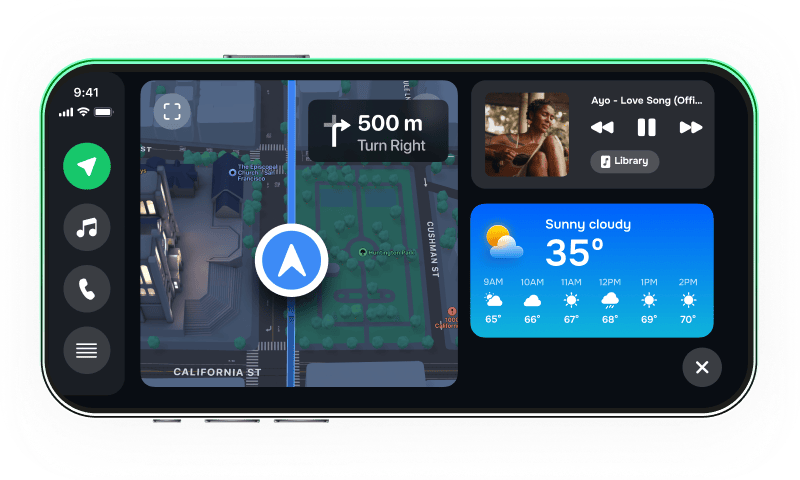
iPhone car dashboard
For Teslas, older cars, motorcycles — Mount Mode runs the dashboard on your iPhone when the car has no CarPlay.
Frequently asked
How do I get lyrics on CarPlay?
To get synced lyrics on CarPlay, install Car Play Connect, enable Dynamic Lyrics in the CarPlay widget stack, and play any time-coded track on Apple Music or Spotify. The active line highlights as the song plays. Setup takes under a minute.
How do I get lyrics on CarPlay in iOS 26?
iOS 26 added widget support to CarPlay for the first time. Add the Dynamic Lyrics widget via Settings → CarPlay → your car → Customize → Widgets. The widget appears in the right pane of the CarPlay screen and tracks the active line in real time.
How do I show lyrics on Apple CarPlay?
Apple's native Music app shows lyrics on CarPlay in iOS 26 if you enable Live Activities under Settings → Music → Notifications. For a karaoke-style highlight that follows the active line, use the Car Play Connect lyrics widget — it works with both Apple Music and Spotify.
Why aren't my CarPlay lyrics syncing?
Three common causes: (1) the track lacks time-coded lyrics — only the great majority of Apple Music tracks have them; (2) Live Activities is disabled for the music app; (3) iOS is below 26.0 (widgets and Live Activities on CarPlay require iOS 26.0+). Update iOS, enable Live Activities, and re-pair CarPlay.
How do I enable Live Activities for CarPlay lyrics?
Go to Settings → Music (or your music app) → Notifications → toggle on Live Activities. Then reconnect CarPlay. The lyrics card will mirror to the CarPlay screen automatically.
Does Spotify show lyrics on CarPlay?
Spotify shows lyrics inside its own app on iPhone but doesn't mirror them to CarPlay natively in 2026. Car Play Connect bridges the gap — it reads Spotify's Now Playing data and renders synced lyrics on the CarPlay screen.
Can I get lyrics on a Tesla without CarPlay?
Yes. Tesla doesn't have native CarPlay yet (announced May 2026, rollout delayed), but Car Play Connect's lock-screen lyrics mode runs on any mounted iPhone. Mount, plug in, lock the screen — lyrics keep playing with the same active-line highlight.
Which music services are supported?
Apple Music and Spotify are the main ones — both with full real-time sync for tracks that have time-coded lyrics. For other services (YouTube Music, Tidal, Amazon Music), lyrics display works for any track in our database; the active-line highlight requires a service with time-coded data.
Built into Car Play Connect.
Lyrics, widgets, sounds, Mount Mode — one app. Free to try.