Add Car Widgets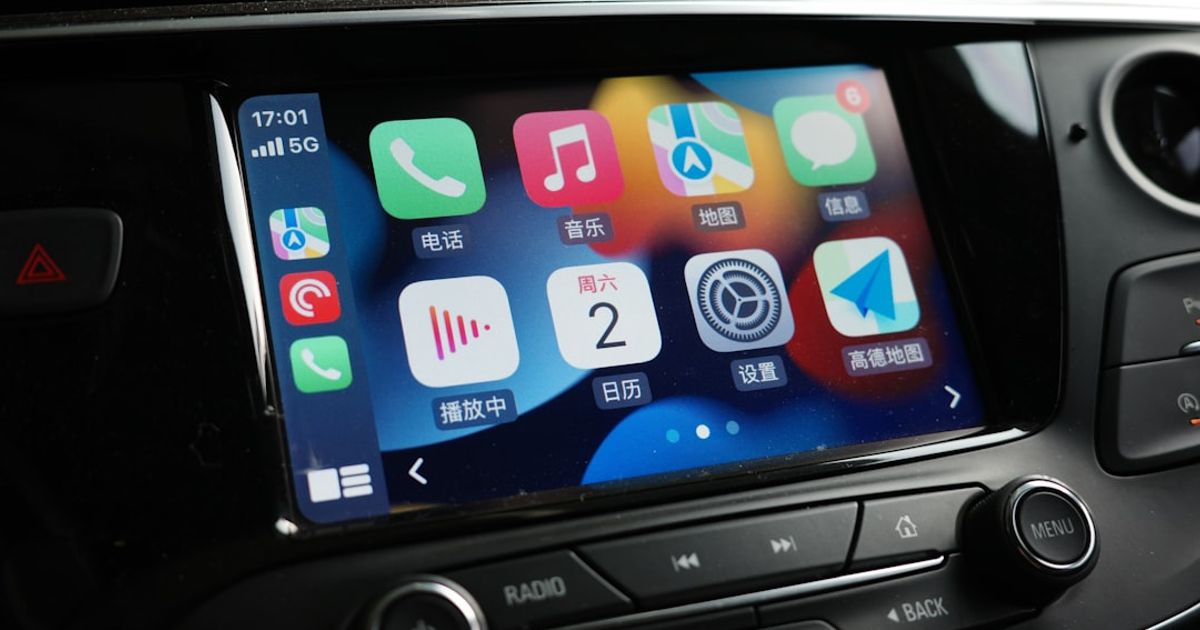
On this page▾
- TL;DR — what CarPlay actually is
- What is CarPlay, really?
- How does CarPlay work (wired vs wireless)?
- Wired CarPlay
- Wireless CarPlay
- Which cars support CarPlay?
- Which apps work on CarPlay?
- What changed in iOS 26: the widget update
- How do you set up CarPlay?
- How is CarPlay different from Android Auto?
- What’s next: Tesla, CarPlay 2, and the future
- CarPlay vs Android Auto, at a glance
- FAQ
Quick answer
Apple CarPlay is a system that mirrors your iPhone onto your car's built-in touchscreen, replacing the car's native interface with iPhone apps (Maps, Music, Messages, Phone, and third-party apps). It requires a CarPlay-compatible head unit (standard on most cars since 2016), a Lightning or USB-C cable, or a wireless connection. iOS 26 added widgets and wallpaper customization to CarPlay.
Almost every explainer of “what is CarPlay” gets the broad strokes right and the actually-useful details wrong. Here's what CarPlay actually is, how it works under the hood, which cars and apps support it, and the iOS 26 update that made it feel modern. If you specifically searched what is Apple CarPlay, that guide walks the same ground with a heavier focus on the current iOS 26 feature set.
TL;DR — what CarPlay actually is
Apple CarPlay is an iPhone-to-car interface that mirrors a simplified version of iOS onto your car's built-in infotainment screen. It runs Maps, Music, Messages, Phone, podcasts, and most third-party music and navigation apps in a driver-safe layout you control via the car's touchscreen, knobs, steering-wheel buttons, or Siri. CarPlay launched in 2014, ships in over 800 car models, and works either through a USB cable (wired CarPlay) or wirelessly over Wi-Fi and Bluetooth. iOS 26 added widget support in June 2025. It's free, requires an iPhone 5 or newer, and turns on automatically the first time you plug in.
What is CarPlay, really?
CarPlay is a projection system. Your iPhone does the computing — running the apps, fetching the directions, streaming the audio — and your car's screen acts as a remote display and input surface. Apple describes it as “a smarter, safer way to use your iPhone in the car,” which in practice means: most factory in-dash software is dated, and CarPlay is the modern alternative that runs on the screen you already paid for. For the mechanics of that projection — how the phone connects, projects, and is controlled — see how CarPlay works (hur fungerar CarPlay).
The important nuance: CarPlay is not a separate operating system. It's a UI layer that the iPhone draws onto a second screen — your car — using a stripped-down design language Apple finalized for driving. The car's native software (the one that handles climate, seat memory, the backup camera) keeps running underneath. CarPlay just takes over the entertainment and navigation pane, usually the center touchscreen.
That's why CarPlay looks identical on a 2017 Mazda 3 and a 2024 Lucid Air: the car is just the canvas. The pixels come from your phone. Apple keeps the design intentionally tight — bigger touch targets than iOS, a fixed grid, no swipe-from-edge gestures, no notifications that aren't from messaging or navigation apps. The whole interface is built for a driver who has 1.5 seconds to glance.
For the official feature list, Apple maintains its own CarPlay overview page — but it's a marketing surface, not a manual. The actual day-to-day reality of using CarPlay (the parts that matter to you) lives below.
How does CarPlay work (wired vs wireless)?
CarPlay has two transports: a USB cable (wired) or a Wi-Fi + Bluetooth handshake (wireless). Both produce the same on-screen experience once the session is live, but the connection process, reliability, and edge cases differ enough that picking the right one matters.
Wired CarPlay
You plug your iPhone into a USB port on the car using a data-capable Lightning or USB-C cable. Within about two seconds the CarPlay interface appears on the car's screen, audio routes through the car speakers, and your iPhone is now also charging. This is the original 2014 implementation and it's still the most reliable in 2026.
The cable matters more than people realize. Charging-only cables (the cheap ones bundled with some accessories) will charge the phone but won't carry the data lines that CarPlay needs. If your phone is charging but CarPlay won't connect, that's almost always the cable — I've written a full diagnostic flowchart that walks through it.
Wireless CarPlay
Wireless CarPlay uses Bluetooth for the initial discovery and handshake, then switches to Wi-Fi (peer-to-peer 5 GHz, not your home network) to carry the actual video and audio stream. You pair the phone once. After that, every time you sit in the car with the phone in your pocket, CarPlay connects automatically within 5-15 seconds.
Wireless feels magical when it works, which is most of the time. The catches: it drains the iPhone battery roughly 1.5x faster than no CarPlay (so you'll usually still want a wireless Qi pad or a separate USB charger in the car), it occasionally fails to hand off cleanly when you leave the car and come back ten minutes later, and a meaningful subset of cars only added wireless support via a software update — sometimes years after the model launched. Wireless CarPlay is standard in most 2022+ cars; before that, it's a coin flip.
Which cars support CarPlay?
CarPlay ships in over 800 car models from 75+ manufacturers, including effectively every major brand except Tesla and Rivian. Apple maintains an official list of CarPlay-equipped vehicles, though it lags behind by a model year or two. As a rough guide: most 2018+ cars from Honda, Toyota, Mazda, Ford, GM, Hyundai/Kia, Subaru, Volkswagen, Audi, BMW, Mercedes, Volvo, Lexus, and Acura ship with CarPlay standard. Some lower trims still leave it off. For a full brand-by-brand breakdown and three quick ways to check your exact model, see which cars have Apple CarPlay.
Holdouts as of 2026: Tesla (announced support in May 2026 but the rollout is delayed indefinitely), Rivian (still no CarPlay, and the R1S/R1T are unlikely to get it), Lucid (no CarPlay on any current model). For everything else, the rule of thumb is: if the car has a touchscreen larger than a phone, it probably runs CarPlay, but check the trim level.
Older cars without factory CarPlay can be retrofitted by replacing the head unit with an aftermarket Pioneer, Kenwood, Sony, or JVC unit that supports CarPlay — typically $300-$800 installed. This is genuinely a good upgrade on cars with otherwise-decent everything else (climate, seats, ride) but a 2015-era infotainment screen.
Which apps work on CarPlay?
CarPlay supports a curated set of app categories: audio (music, podcasts, audiobooks), communication (messaging, calls, VoIP), navigation (maps, EV charging, parking), and a few utility categories (food ordering, car maker apps, fueling). Apps in those categories must use a CarPlay-specific API Apple provides — they can't just port their iPhone UI over.
What works out of the box: Apple Maps, Apple Music, Podcasts, Phone, Messages, Calendar (read-only). What works after you install the iPhone app: Spotify, Audible, Google Maps, Waze, YouTube Music, Amazon Music, Tidal, Overcast, Castro, Pocket Casts, WhatsApp (calls + Siri-dictated messages), Telegram, Signal, ChargePoint, Electrify America, A Better Route Planner, PlugShare, Yelp, OpenTable, and a few hundred others.
What does not work and probably never will: TikTok, YouTube video, Netflix, Safari, full web browsers, games, photo editing, anything with a video output that isn't time-coded lyrics or navigation. Apple's CarPlay App Programming Guidelines flatly disallow video playback and most general-purpose UI — the goal is to keep your eyes on the road. There's a slightly looser CarPlay variant for “parked” or “passenger” modes Apple is testing, but in 2026 it's still rolled out to almost nothing.
There's a working list of useful day-to-day apps in our widget guide— and it differs from Apple's marketing-page picks.
Lyrics make the cut
One of the few visuals CarPlay allows on screen — lyrics
Car Play Connect puts time-coded Musixmatch lyrics for Apple Music and Spotify on the CarPlay display, one of the rare non-navigation visuals Apple's driving guidelines permit.

Car Play Connect: Auto Sync
4.6·2,300+ ratings·Free to try

What changed in iOS 26: the widget update
For eleven years CarPlay was an app launcher with a built-in navigation pane and a music pane. iOS 26, released in June 2025, brought the biggest change since launch: a five-slot widget stack that runs in the right-hand pane on every CarPlay screen. Glanceable info that updates without you tapping anything.
The widgets come from your iPhone's normal widget gallery. Weather, calendar, reminders, photos, music now-playing, battery, AQI, sports scores, and a custom note — all five slots are customizable per-car via iPhone Settings → CarPlay → your car → Widgets. Third-party widgets opt in automatically if they meet Apple's accessibility guidelines.
This is the update that made CarPlay feel current. Before iOS 26, glanceable info meant either tapping into an app or relying on the music tab. After iOS 26, you get the weather, your next meeting, the photo of your kid, and the battery on your AirPods all visible at once without touching the screen. Full breakdown of which widgets actually earn a slot and which ones look great in screenshots and useless in practice: see our iOS 26 widgets review.
How do you set up CarPlay?
First-time CarPlay setup takes under two minutes for wired and about five for wireless. You need an iPhone running iOS 7.1 or later (in practice, iOS 17+ for the modern feature set), a CarPlay-equipped car, and either a data-capable cable or a few minutes for the wireless pairing dance.
- Wired:Start the car. Plug the iPhone into a USB port labeled with the CarPlay icon (a phone-and-car silhouette) or, if no labels, into the port nearest the dashboard. Tap “Allow” on the iPhone when it asks. CarPlay launches within seconds.
- Wireless:Start the car. On the car's screen, find the CarPlay or Bluetooth pairing menu (varies by manufacturer). On the iPhone, open Settings → General → CarPlay → Available Cars → select your car. Confirm the pairing code that appears on both screens. Wait ~30 seconds for the first Wi-Fi handoff. After that initial pairing, every subsequent connection is automatic.
- Customize the app layout in iPhone Settings → CarPlay → your car → Customize. Drag apps to reorder. Hide ones you never use.
- Set your widget stack (iOS 26+): iPhone Settings → CarPlay → your car → Widgets. Pick five.
- Optionally change the wallpaper (eight built-ins) under iPhone Settings → CarPlay → your car → Wallpaper.
If CarPlay doesn't launch automatically after the first plug-in, the most common causes are a charging-only cable, a USB port that doesn't carry data, or a CarPlay toggle that was turned off in the car's infotainment menu. The diagnostic flowchart linked earlier catches all three.
After the setup steps
Now fill those five widget slots with something useful
Once CarPlay is set up, Car Play Connect offers 11 purpose-built widgets — album-locked Photos, GPS speedometer, weather, calendar — for iOS 26's five slots.
Car Play Connect: Auto Sync
Free to try
How is CarPlay different from Android Auto?
CarPlay and Android Auto are the same idea — phone projects to car screen — built by competing ecosystems for incompatible phones. CarPlay only works with iPhone; Android Auto only works with Android. Almost every CarPlay-equipped car also supports Android Auto, and vice versa, so the car-side hardware is rarely the limiter.
Differences that matter in 2026: CarPlay's widget system (iOS 26) is more mature than Android Auto's equivalent (Google Assistant cards), which Google has scaled back. Android Auto has tighter Google Maps integration and a slightly faster wireless reconnect on most cars. CarPlay has dramatically better third-party music app polish (Spotify, Apple Music, and the long tail of podcast apps all look closer to native on CarPlay than they do on Android Auto). Siri vs Google Assistant is roughly a wash for navigation, with Google still ahead on local business queries.
For most drivers the answer is: use whichever one matches your phone. Both work. Neither is so much better that you'd switch phones for it. If you're shopping for a car, make sure it has whichever projection system your phone uses — and ideally both, because partners, passengers, and resale value all care. Running an Android phone or an Android head unit? See whether CarPlay works with Android and the honest ways to mix the two.
What's next: Tesla, CarPlay 2, and the future
Two big things are moving in 2026. First, Tesla announced CarPlay support at its May 2026 investor day after eleven years of holding off — then immediately delayed the rollout, citing unspecified iPhone software issues. As of June 2026, no Tesla on the road has native CarPlay, and Tesla hasn't confirmed a ship date. The path for current Tesla owners is still the workarounds (hardware adapters or phone-mount mode); see our iOS 26 widget guide for the mount-mode setup that replicates most of the CarPlay experience on the iPhone screen itself.
Second, Apple has been talking about “CarPlay 2” — a deeper integration that replaces the entire car infotainment, including the instrument cluster, climate controls, and speedometer — since 2022. Aston Martin and Porsche announced CarPlay 2 in 2023. As of 2026, only a small number of model-year-2025 cars from those two brands actually ship it. The broader rollout is “coming” in the same way folding iPhones are “coming.” Don't plan around it.
For drivers in 2026, the practical takeaway is: CarPlay as we know it (the right-pane projection, the widget stack, the curated app list) is the version you'll be using for the next two or three years across virtually every new car. The community on r/CarPlay tracks every Tesla and CarPlay 2 announcement in real time if you want to follow along.
CarPlay vs Android Auto, at a glance
Same idea, competing ecosystems. If you're deciding what matters when you shop for a car, here's how the two projection systems compare on the points that actually differ in 2026.
| Apple CarPlay | Android Auto | |
|---|---|---|
| Works with | iPhone only | Android only |
| Widgets | Mature five-slot stack (iOS 26) | Assistant cards, scaled back by Google |
| Third-party music polish | Closer to native (Spotify, podcast apps) | A notch behind |
| Maps integration | Apple Maps, Google Maps, Waze | Tighter Google Maps |
| Wireless reconnect | Slightly slower on most cars | Slightly faster |
| Voice assistant | Siri | Google Assistant (ahead on local search) |
One thing worth knowing before you rely on it daily: the rules for using CarPlay while driving vary by region. If you drive down under, see whether CarPlay is legal in Australia and the rules by state.
FAQ
Is CarPlay free?
Yes. CarPlay is a free feature of iOS — there is no subscription, no in-app purchase, no Apple service tier required. You also don't pay your car manufacturer anything extra to use it if your car shipped with CarPlay support. The only money you might spend is on a data-capable USB cable (if the one in the box is charging-only), a wireless CarPlay adapter (if your car is wired-only and you want wireless), or an aftermarket head unit (if your car has no CarPlay at all).
What iPhones support CarPlay?
Every iPhone since the iPhone 5 (2012) supports CarPlay. In practice, you want an iPhone running iOS 17 or later to get the modern CarPlay experience — the dashboard view, the multi-pane layout, and SharePlay. For the iOS 26 widget update, you need iOS 26 or later, which runs on iPhone XS and newer. If your iPhone runs Apple Music, it runs CarPlay.
Does CarPlay work without internet?
Partially. CarPlay itself doesn't need internet to project — wired CarPlay works on airplane mode. But most of the apps you'll use through CarPlay (Maps, Music streaming, Messages over data, Spotify) need a cellular or Wi-Fi connection to function. Downloaded music and offline Maps regions work offline. Real-time traffic, search, and streaming do not. Wireless CarPlay itself uses the iPhone's Wi-Fi radio for the local handoff but doesn't require an internet connection.
What's the difference between CarPlay and Bluetooth audio?
Bluetooth audio just streams sound from your phone to your car speakers — no screen, no apps, no navigation, no Siri integration on the car's display. CarPlay does all of that plus Bluetooth audio. If your car only supports Bluetooth, you can still take calls and play music from your phone, but you can't see Maps on the car screen or control Spotify with the car's knob. CarPlay is the upgrade Bluetooth audio could never be.
Can I use CarPlay without the car's subscription service?
Yes. CarPlay is entirely independent of car-maker subscription services like GM OnStar, BMW ConnectedDrive, Toyota Connect, or Mercedes me. Those services use the car's built-in cellular modem for things like remote start, stolen-vehicle tracking, and emergency calls. CarPlay uses your iPhone's cellular and Wi-Fi. You can let the car-maker subscription lapse and CarPlay keeps working exactly as before.
How do I turn off CarPlay?
Unplug the cable (or toggle Bluetooth off for wireless) to end the current session. To stop it for good, open Settings → General → CarPlay, tap your car, and choose Forget This Car — or block it on every car through Screen Time. The how to turn off CarPlay guide covers all five methods, temporary and permanent.
Is Apple CarPlay free?
Yes. CarPlay is built into every iPhone since iOS 7.1 and costs nothing to use — no subscription, no activation fee, nothing to download. The only real costs are indirect: a car or head unit that supports it, a cable or wireless adapter, and any optional paid apps you add on top.
That's the working definition. If you're setting it up for the first time, the troubleshooting flowchart catches the things that go wrong on day one. And if you've already got CarPlay working and want the version with widgets, glanceable photos of your dog, and a custom startup sound: see what Car Play Connect adds on top.