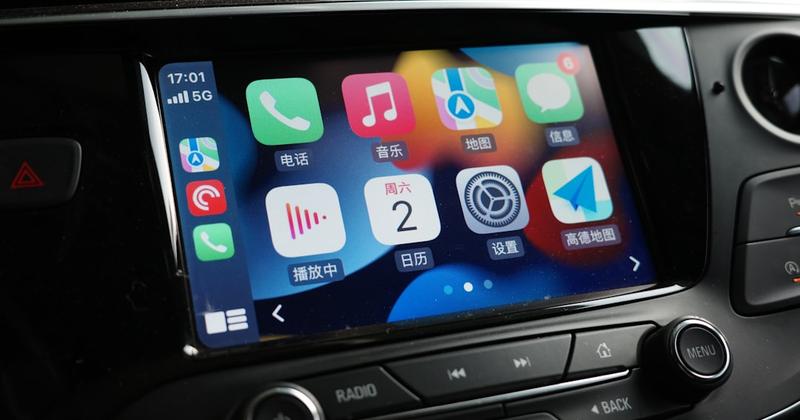
Add Car Widgets
On this page▾
- The 30-second legality check
- Is CarPlay itself legal in Australia?
- CarPlay road rules by state and territory
- The learner and P-plate rule that catches people out
- Step 1: Fix your phone in a legal mount
- Step 2: Set your route and audio before you drive
- Step 3: Control CarPlay by voice or the car screen
- Step 4: Check the rule for your licence and state
- Frequently Asked Questions
Quick answer
Yes — using Apple CarPlay is legal in every Australian state and territory. Fully licensed drivers may use it when the phone sits in a fixed, commercial mount and is controlled hands-free: by voice, steering-wheel buttons, or the car's built-in screen. Learner and P-plate drivers are banned from all phone use, CarPlay included.
Wired or wireless, CarPlay is a legal setup in Australia for one reason: the phone stays mounted and you never pick it up while the car is moving.
The rules are stricter than most drivers assume, and they flip completely the moment a learner or P-plater takes the wheel. This guide covers what's legal for full, L, and P licences, the fines and demerit points by state, and how to use CarPlay without ever risking a ticket. New to CarPlay entirely? Start with our what is CarPlay guide for Australian drivers.
The 30-second legality check
Answer these three questions first. They tell you which rules apply to you before you read a single state table.
- Are you fully licensed?If yes, and your phone is in a fixed mount used hands-free, CarPlay is legal in every state. You're fine — skip to the setup steps.
- On L, P1, or P2 plates? Almost any phone use is illegal for you, and that includes CarPlay through the car screen. Go straight to the L and P-plate section below.
- About to touch your handset to text, dial by hand, or scroll?That's illegal everywhere, mounted or not. Use voice or the car's screen instead.
Less reaching, more driving
Set your dashboard once, drive hands-free.
Car Play Connect puts navigation, music, and glanceable widgets on your CarPlay screen — so you control what you need by voice or a glance, the way every state's law wants.

Car Play Connect: Auto Sync
4.6·2,300+ ratings·Free to try

Is CarPlay itself legal in Australia?
CarPlay as software is completely legal. No state bans the feature. What the law regulates is how you touch and hold the phone while driving, and that distinction is where people trip up.
Here's the part worth understanding: the road rules target the handheld phone, not the car's fitted display. Running CarPlay on your car's built-in touchscreen is treated like using the vehicle's own controls, so a full-licence driver can tap that screen. Picking up the phone itself — even a mounted one — to type a message is a different offence.
Wired or wireless makes no legal difference. With wireless CarPlay the phone can sit in a cradle or even a console tray, as long as you don't operate the handset directly. If CarPlay is new to you, our what is CarPlay explainer covers how the connection works before you worry about the rules.
CarPlay road rules by state and territory
The core rule is national: for a fully licensed driver, a mounted, hands-free phone running CarPlay is legal everywhere. What changes state to state is the size of the fine and the number of demerit points if you get it wrong. Fines are indexed each year, so treat these as a guide and confirm the current figure with your state's transport authority.
| State / Territory | Mounted CarPlay, full licence | L & P plate drivers | Demerit points | Typical fine |
|---|---|---|---|---|
| NSW | Legal, hands-free | Banned (all phone use) | 5 | ~$410 (double demerits on holidays) |
| Victoria | Legal, hands-free | Banned | 4 | ~$590 |
| Queensland | Legal, hands-free | Banned (P2 over 25 may go hands-free) | 4 | ~$1,209 (highest in the country) |
| WA | Legal, hands-free | Banned | 3–4 | ~$500 (holding) / ~$1,000 (texting) |
| SA | Legal, hands-free | Banned | 3 | ~$590 |
| Tasmania | Legal, hands-free | Banned | 3 | ~$390 |
| ACT | Legal, hands-free | Banned | 3–4 | ~$514–$632 |
| NT | Legal, hands-free | Banned | 3 | ~$500 |
Several states, including NSW, now run mobile-detection cameras that photograph drivers holding a phone, so “no one saw me” is a weaker bet than it used to be. Transport for NSW spells out the mounted-cradle rule in plain terms on its official mobile phones page, and every other state publishes an equivalent.
The learner and P-plate rule that catches people out
This is the single biggest misunderstanding, so read it twice. In most states, learner, P1, and P2 drivers cannot use a phone at allwhile driving — not held, not mounted, not by Bluetooth, and not through CarPlay on the car screen.
- Learner and P1: a total ban on phone use in NSW, VIC, QLD, SA, and others. The car-screen exception that helps full-licence drivers does not apply to you.
- P2:also banned in most states. Queensland is the notable exception — P2 drivers aged 25 and over may use a hands-free phone under the same limits as an open licence.
- Why CarPlay counts:the ban covers “any function” of the phone. Because CarPlay mirrors and controls the phone, using it — even to change a song on the car screen — falls under the same ban.
If you're on your Ps, the safe answer is simple: set your music and destination before you drive, then leave everything alone until you park. Passengers can operate CarPlay for you.
Step 1: Fix your phone in a legal mount
Every state requires the phone to be secured in a commercially manufactured mount fixed to the car if you use it while driving. A phone loose on the seat, in your lap, or wedged in a vent without a proper cradle is not a legal setup, even for a full licence.
- Use a purpose-built cradle or vent mount — not tape or a loose tray.
- Fit it where it does not block your view of the road, front or sides.
- For wireless CarPlay, the phone can sit in the cradle or a console tray, as long as you never pick it up while moving.
A tidy, glance-friendly dashboard matters as much as the mount itself. Our CarPlay mount mode guideshows how to keep the essentials visible so you're never tempted to reach for the handset.
Step 2: Set your route and audio before you drive
The law wants your interaction with the phone to happen while you're stopped. Do the fiddly parts before you move off, and driving becomes a hands-free, legal experience.
- While parked, open Maps and enter your destination so navigation is already running.
- Start your playlist, podcast, or radio station so you're not searching later.
- Place any call before you pull out, or wait until you're stopped again.
If you're still setting CarPlay up for the first time, walk through our step-by-step CarPlay setup guide first, then come back to lock in the legal habits.
Step 3: Control CarPlay by voice or the car screen
Once you're moving, keep the handset untouched. You have three legal ways to control CarPlay, and all of them keep your hands off the phone itself.
- Siri:hold the steering-wheel voice button and speak — “navigate home,” “call Mum,” “play my drive playlist.”
- Steering-wheel controls: skip tracks and answer calls without lifting a finger from the wheel.
- The car's built-in screen:a quick tap on the fitted display is legal for full-licence drivers, because you're using the vehicle, not the phone.
A good app layout means you barely need any of these. Picking apps that surface info at a glance keeps your eyes up — see our pick of the best CarPlay apps for 2026.
Built for glance, not touch
Keep your eyes on the road, not the phone.
Car Play Connect's widgets and dashboard mode surface navigation, music, and weather on the car screen — so you rarely touch the handset, exactly what every Australian state requires.
Car Play Connect: Auto Sync
Free to try
Step 4: Check the rule for your licence and state
The general rules above hold nationwide, but wording and penalties differ, and they change. Before you rely on any setup, confirm the current rule for your exact licence and state.
- Search your state or territory transport authority for “mobile phone road rules.”
- Check the section for your licence type — full, P2, P1, or learner.
- Note the current fine and demerit points, since both are indexed and rise most years.
Apple also documents what CarPlay can and can't do while driving on its official CarPlay page. If CarPlay keeps dropping out and tempting you to grab the phone, fix that first with our CarPlay keeps disconnecting guide.
Frequently Asked Questions
Is it legal to use Apple CarPlay while driving in Australia?
Yes. Using CarPlay is legal in every state and territory for fully licensed drivers, as long as your phone is secured in a fixed, commercial mount and you operate it hands-free — by voice, steering-wheel buttons, or the car's built-in screen. Holding or touching the handset to text or scroll is illegal nationwide, mounted or not.
Can P-platers and learner drivers use CarPlay?
No, in most states. Learner, P1, and P2 drivers are banned from all phone use while driving — including CarPlay through the car screen, Bluetooth, and hands-free. Queensland is the exception: P2 drivers aged 25 and over may use a hands-free phone. Always check your state's transport authority, because the ban is worded to cover every phone function.
Is it legal to touch the CarPlay screen while driving?
Touching the car's built-in screen to run CarPlay is generally legal for fully licensed drivers, because the law targets the handheld phone, not the vehicle's fitted display. You still must not drive distracted. Touching your actual phone to text or scroll is not allowed, and for L and P drivers even the car-screen exception does not apply.
Do I need my phone in a cradle to use CarPlay legally?
Yes. Every state requires the phone to be secured in a commercially manufactured mount fixed to the car if you use it while driving. A phone loose on the seat or in your lap is not legal to operate. With wireless CarPlay the phone can sit in a cradle or console tray, provided you control everything hands-free and never pick it up while moving.
How much is the fine for illegal phone use while driving?
It varies by state. Fines range from about $390 in Tasmania to over $1,200 in Queensland, plus 3 to 5 demerit points. NSW and several other states run mobile-detection cameras and apply double demerits on holiday long weekends. Amounts are indexed yearly, so check your state's transport authority for the current figure.
Should I set up navigation before I start driving?
Yes, and it keeps you legal. Enter your destination, pick your playlist, and place any call before you move off, while the car is parked. Once you're driving, use Siri, steering-wheel controls, or the car screen. Setting up while stopped keeps you on the right side of the law in every state and territory.