Add Car Widgets
On this page▾
- The 30-second test: does your car already have CarPlay?
- Step 1: Check whether your car supports CarPlay
- Step 2: Connect your iPhone to start CarPlay
- Step 3: See what CarPlay actually does on the road
- Step 4: Add CarPlay to a car that didn't come with it
- Fix 5: When CarPlay won't start or keeps dropping
- Frequently Asked Questions
Quick answer
Apple CarPlay is a system that shows your iPhone's apps — Maps, music, calls, and messages — on your car's screen, so you can use them safely while you drive. It connects by cable or wirelessly, works with most cars sold since about 2016, and costs nothing once your car supports it. You control it with taps, steering-wheel buttons, or Siri. It is not an app you download — it's a feature built into iOS and into the car itself.
“Vad är CarPlay” is Swedish for “what is CarPlay” — and the short answer is that it puts a simple, driving-safe version of your iPhone on the car's display. CarPlay behaves a little differently on a factory screen, an aftermarket head unit, and a mounted iPhone in a car with no CarPlay at all, so this guide explains what CarPlay is and how to start using it in your car.
You don't need to buy anything to find out whether you already have it. Curious what happens under the hood once it starts? How CarPlay works (hur fungerar CarPlay) explains the mechanism. Ready to see CarPlay for yourself? Start with the 30-second test below, then work through the steps in order.
The 30-second test: does your car already have CarPlay?
Before you read any further, check what your car can already do. Plug your iPhone into the car's dataUSB port — the one near the screen, not a back-seat charging port — start the engine, and watch the display:
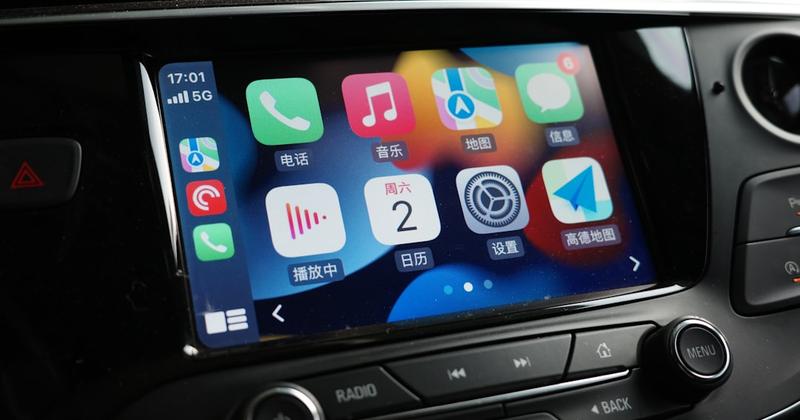
- The car screen changes to rows of large app icons.That is CarPlay. Your car supports it — skip to Step 2 to finish connecting.
- Nothing happens on any USB port, but the car is from 2016 or later.CarPlay may be off in a menu, or the port may be charge-only. Step 1 sorts this out.
- You drive a Tesla or a car older than about 2014.These never shipped CarPlay and can't be updated to it. Step 4 covers how to add it anyway.
No CarPlay screen in the car?
Run a CarPlay-style dashboard on the iPhone you already own
If the 30-second test came up empty — a Tesla, an older car, a rental — Car Play Connect's Mount Mode turns a mounted iPhone into a driving dashboard: big Maps, a GPS speedometer, and glanceable widgets, with audio over Bluetooth. Free to try before you spend a cent on hardware.

Car Play Connect: Auto Sync
4.6·2,800+ ratings·Free to try


CarPlay is not the same as pairing your phone over Bluetooth, and it's not Android Auto. Here's how the three compare, so you know exactly what CarPlay gives you:
| What it is | Works with | Shows apps on the car screen? | Best for |
|---|---|---|---|
| Apple CarPlay | iPhone | Yes — Maps, music, messages, calls | iPhone owners who want the full car screen |
| Android Auto | Android phones | Yes — the Google equivalent | Android owners; not usable from an iPhone |
| Plain Bluetooth | Any phone | No — audio and calls only | Older cars with no CarPlay screen |
Step 1: Check whether your car supports CarPlay
Most cars sold since about 2016 support CarPlay, but not all trims did, and some hide the setting. Confirm it in a minute:
- Look in your car's settings for a CarPlay, Smartphone, or Apple CarPlay menu, or a CarPlay logo near the USB port.
- Check the port itself — the CarPlay port is usually marked with a phone or CarPlay icon, and it must be a data port, not charge-only.
- Still unsure? The list of cars with Apple CarPlay settles it by make, model, and year.
When this won't confirm it:a few base trims from 2016–2018 skipped CarPlay even though the same model offered it. If your exact car and year isn't listed as supported, it likely never had it — jump to Step 4 to add it.
Step 2: Connect your iPhone to start CarPlay
Once you know your car supports CarPlay, starting it takes under a minute. Wired is the most reliable first connection, even if your car also does wireless:
- Make sure Siri is on: Settings → Siri & Search, then enable it. CarPlay won't start without Siri.
- Plug your iPhone into the data USB port with a known-good Apple cable.
- Tap Allow when the car or iPhone asks to use CarPlay, and the app grid appears on the car screen.
- If your car lists Wireless CarPlay in its Bluetooth menu, pair once and you can leave the cable out next time.
The full walkthrough, including wireless pairing, is in how to set up Apple CarPlay. If CarPlay is greyed out on the iPhone side, enabling CarPlay on your iPhone walks through the toggles.
Step 3: See what CarPlay actually does on the road
Now that it's running, here's what CarPlay is actually for. It shows a small set of driving-safe apps as big icons you can tap or reach with Siri:
- Maps and navigation — Apple Maps, Google Maps, or Waze, full-screen with voice guidance.
- Music and audio — Apple Music, Spotify, podcasts, and audiobooks on the car speakers.
- Calls and messages — Siri reads texts aloud and sends replies so you keep your hands on the wheel.
- A home screen of widgets — iOS 26 adds a dashboard with a few glanceable tiles.
The honest limit:CarPlay only runs apps that Apple approves for driving, so you can't watch video or browse the web on it. It also stays fairly plain — even iOS 26 skips a GPS speedometer and album-locked Photos. That's the gap Car Play Connect fills with 11 car-tuned widgets and a custom startup sound.
Once CarPlay is running
Add the widgets and speedometer stock CarPlay leaves out
Standard CarPlay is deliberately plain. Car Play Connect adds a GPS speedometer, destination weather, album-locked Photos, and 11 glanceable widgets to your CarPlay dashboard — plus a custom startup sound. Free to try, so you can see the difference on your next drive.
Car Play Connect: Auto Sync
Free to try
Step 4: Add CarPlay to a car that didn't come with it
No CarPlay screen at all? You still have real options, cheapest to most involved. None of these needs the car to have shipped with CarPlay:
- Mount your iPhone and run a CarPlay-style dashboard app. It suits a Tesla or any car without CarPlay — see Car Play Connect's Mount Mode. Free to try.
- Add a wireless adapter if your car has wired CarPlay and you only want to lose the cable — see how to get wireless CarPlay.
- Fit an aftermarket head unit from Pioneer, Kenwood, Sony, or Alpine for a permanent, factory-like screen — roughly $300–800 installed.
For the full breakdown of every route — built-in, head unit, portable, and phone-as-screen — read how to get a CarPlay screen (skärm) in any car.
Fix 5: When CarPlay won't start or keeps dropping
CarPlay that won't launch is almost always a cable, port, or setting — not a broken car. Work through these in order:
- Swap the cable and USB port — a failing cable is the single most common cause.
- Check that Siri is on in Settings → Siri & Search; CarPlay can't start without it.
- Toggle CarPlay off and on in Settings → General → CarPlay and re-pair the car.
- Update both iOS and the car's software — a mismatched pair often drops after an update.
When this won't settle it:if CarPlay still won't start, the full walkthrough in why Apple CarPlay isn't working covers the rarer causes, from USB restrictions to a disabled Siri.
Frequently Asked Questions
What is Apple CarPlay in simple terms?
Apple CarPlay is a way to show your iPhone's apps on your car's screen so you can use them safely while driving. It mirrors a driving-safe version of Maps, music, calls, and messages, controlled by tapping the screen, using steering-wheel buttons, or asking Siri. It connects by cable or wirelessly and is free once your car supports it.
Is Apple CarPlay free?
Yes, Apple CarPlay is free. There is no subscription and no app to buy — it's built into iOS and into any car that supports CarPlay. You only pay if your car lacks CarPlay and you add it with an aftermarket head unit or a wireless adapter, which is hardware, not a CarPlay fee.
How do I know if my car has CarPlay?
Plug your iPhone into the car's data USB port and start the engine — if the screen shows rows of large app icons, your car has CarPlay. You can also look for a CarPlay logo near the USB port or a CarPlay entry in the car's settings. The list of cars with Apple CarPlay confirms it by make and year.
What is the difference between CarPlay and Android Auto?
CarPlay works with iPhones and Android Auto works with Android phones — that's the main difference. Both put a driving-safe version of your phone on the car screen with maps, music, and messages. You can't use CarPlay from an Android phone or Android Auto from an iPhone; the car screen shows whichever matches the phone you plug in.
Do I need internet for CarPlay to work?
No, CarPlay itself doesn't need internet to connect — it runs off your iPhone. But the apps inside it do use your phone's data: Maps needs a signal to route, and streaming music needs data unless it's downloaded. Calls and downloaded music work even with no signal.
Is CarPlay an app?
No. CarPlay isn't something you find and download in the App Store — it's a feature built into iOS that switches on when you connect a compatible iPhone to a compatible car. The things you see on the car screen, like Maps or Spotify, are apps already on your iPhone; CarPlay just shows a driving-safe version of them on the bigger screen. If your car supports CarPlay and your iPhone is updated, there's nothing extra to install.
What does CarPlay actually do in a car?
In the car, CarPlay takes over part of the factory screen and replaces it with a simplified version of your iPhone: large icons for Maps, music, calls, and messages, arranged so you can glance at them instead of looking down at your phone. You tap the screen, use the car's steering-wheel buttons, or talk to Siri, while the car's own speakers and microphone handle the audio and calls.
Can I get CarPlay if my car doesn't have it?
Yes. You can add CarPlay to a car that didn't ship with it by mounting your iPhone and running a dashboard app like Car Play Connect's Mount Mode, fitting an aftermarket head unit, or adding a wireless adapter if the car already has wired CarPlay. A mounted iPhone is free to try and works even in a Tesla.
Whether your car has CarPlay built in or you're adding it, standard CarPlay stays thin — even iOS 26 skips a GPS speedometer, album-locked Photos, and destination weather. Car Play Connect adds 11 car-tuned widgets, a custom startup sound, and a Mount Modedashboard for cars with no CarPlay screen at all. Or read Apple's own CarPlay overview and its list of CarPlay cars.