Add Car Widgets
On this page▾
- What is CarPlay, in plain English?
- The 30-second test: does your car already have it?
- Which cars sold in Australia have CarPlay?
- Step 1: Confirm your iPhone and car support CarPlay
- Step 2: Connect your iPhone with a cable (wired CarPlay)
- Step 3: Switch to wireless CarPlay
- Step 4: Rearrange apps and add iOS 26 widgets
- Which apps work on CarPlay?
- Is it legal to use CarPlay while driving in Australia?
- CarPlay vs Android Auto, at a glance
- Frequently Asked Questions
Quick answer
CarPlay is Apple's system that puts your iPhone's maps, music, calls, and messages on your car's built-in touchscreen. It runs your phone's apps through the car's fitted display and speakers in a simplified, driver-safe layout. In Australia it ships standard on most cars sold since about 2018, and it's free — no subscription, nothing to activate.
CarPlay is one of the most useful features a car can have. The honest limitation: the factory version is fairly bare until you add a few widgets, so this guide covers both the stock setup and how to go beyond it.
This is the Australian-driver version of the question. If you want the global feature rundown instead, our guide to what Apple CarPlay iscovers the same ground with a heavier iOS 26 focus.
What is CarPlay, in plain English?
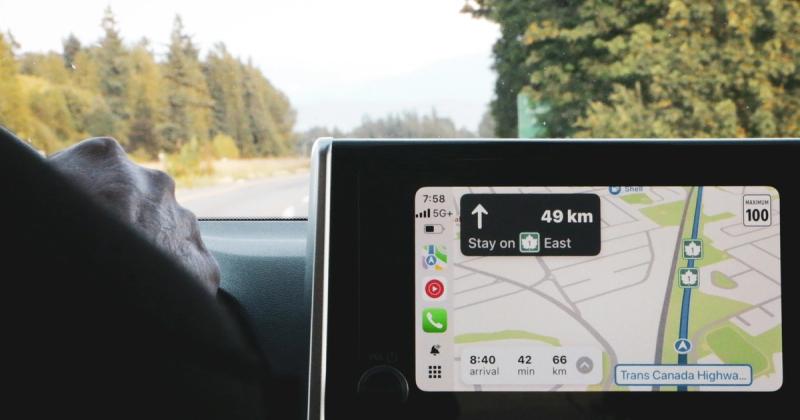
CarPlay is a projection system, not a separate operating system. Your iPhone does the work — running the apps, fetching directions, streaming audio — and the car's screen acts as a bigger, safer display and control surface. The car's own software (climate, reversing camera, seat memory) keeps running underneath. CarPlay just takes over the middle screen.
That's why CarPlay looks the same in a base HiLux and a Lexus. The car is only the canvas; the pixels come from your phone. Apple keeps the layout tight on purpose: bigger buttons than iOS, a fixed grid, and no video or web browsing. The whole thing is built for a driver who has a second and a half to glance.
The 30-second test: does your car already have it?
Before you read further, check whether you even need a setup guide. Do one of these three things:
- Look for the CarPlay icon (a car with a phone inside) printed next to a USB port or in the car's menu.
- Plug your iPhone into the front USB port and start the car — if CarPlay pops up, you're done.
- Open the car's connectivity or phone-projection settings and look for “Apple CarPlay” in the list.
If none of those show CarPlay, your car (or that trim) probably shipped without it. Skip to the retrofit note in the cars section below.
See it in action
Turn a plain CarPlay screen into your dashboard
Car Play Connect: Auto Sync adds widgets, a custom startup sound, and a mount mode on top of stock CarPlay. Free to try on the App Store.

Car Play Connect: Auto Sync
4.6·2,735+ ratings·Free


Which cars sold in Australia have CarPlay?
Most new cars sold in Australia since about 2018 include CarPlay, including the country's best sellers — the Ford Ranger and Toyota HiLux both ship it. Holden is gone, but nearly every brand still on sale here supports CarPlay on mid and upper trims. Base models sometimes leave it off, so always check your exact build.
| Make | Popular in Australia | CarPlay? | How it connects |
|---|---|---|---|
| Toyota | HiLux, RAV4, Corolla | Yes, most 2019+ | Wired; wireless on newer models |
| Ford | Ranger, Everest | Yes, 2017+ | Wireless on 2022+ Ranger |
| Mazda | CX-5, Mazda 3, BT-50 | Yes, 2018+ | Wired |
| Hyundai | i30, Tucson, Kona | Yes, most 2018+ | Wireless on smaller screens |
| Kia | Sportage, Cerato, Seltos | Yes, most 2018+ | Wired or wireless by model |
| Isuzu | D-Max, MU-X | Yes, current generation | Wired |
| Subaru | Forester, Outback | Yes, 2019+ | Wired |
Treat the years as a guide, not a promise — trim level and delivery date matter more than the badge. For a full make-by-make breakdown and three ways to confirm your exact model, see which cars have Apple CarPlay. Older cars can be retrofitted: an auto electrician fits an aftermarket Pioneer, Kenwood, Sony, or JVC head unit that supports CarPlay, usually for a few hundred dollars installed. To weigh that against the other routes, compare the best CarPlay screen options for Australia.
Step 1: Confirm your iPhone and car support CarPlay
Check two things first. Your iPhone needs iOS 7.1 or later — any iPhone from the last decade qualifies, and iOS 17 or newer gets you the modern features. Your car needs CarPlay support, which you confirmed in the 30-second test above.
When this won't work:a handful of base trims and fleet builds skip CarPlay even when the same model offers it higher up the range. If the connectivity menu has no CarPlay entry at all, the hardware isn't there — a software update won't add it, and a retrofit head unit is the only fix. New to the platform? Our full setup guide walks the same steps in more detail.
Step 2: Connect your iPhone with a cable (wired CarPlay)
Wired is the most reliable way to start. Start the car, then plug the iPhone into the USB port marked with the CarPlay icon — or, if none are labelled, the port nearest the dash. Use a data-capable Lightning or USB-C cable. Tap Allow on the phone. CarPlay appears within a couple of seconds and the phone starts charging too.
When this won't work:the cable is the usual culprit. Cheap charge-only cables power the phone but don't carry the data lines CarPlay needs. If the phone charges but nothing shows on the screen, swap the cable for a known-good one before you blame the car.
Step 3: Switch to wireless CarPlay
If your car supports wireless CarPlay, you skip the cable for good. Open iPhone Settings → General → CarPlay, tap your car, and pair it over Bluetooth and Wi-Fi. After that first pairing, CarPlay connects on its own within about 5–15 seconds every time you get in with the phone in your pocket.
When this won't work: wireless only exists on cars that shipped with it (mostly 2022 and newer here) or added it by update. It also drains the iPhone faster, so keep a charge cable or a wireless pad in the car. If pairing fails, delete the car under Settings → General → CarPlay and start the pairing again.
Step 4: Rearrange apps and add iOS 26 widgets
On the CarPlay home screen, press and hold any app icon and drag it into the order you want — put Maps and your music app on the first page. On iOS 26, open Settings → CarPlay → your car → Widgets to fill the new right-hand pane with glanceable tiles: weather, calendar, next turn, now-playing.
The five stock widget slots are fine, but limited. To go past them — a live lyrics tile, a big speedometer, or a full mount mode when you don't have a screen at all — one option is Car Play Connect: Auto Sync. You install it, open it, choose the widgets you want, and they show up in the CarPlay pane. For the stock options first, our iOS 26 widgets guide covers which ones actually earn a slot.
Which apps work on CarPlay?
CarPlay supports a curated set of app types: audio, messaging and calls, navigation, and a few utilities. Apps have to use Apple's CarPlay layout, so they can't just copy their phone screen across.
Works out of the box: Apple Maps, Apple Music, Podcasts, Phone, Messages. Works once you install the phone app: Google Maps, Waze, Spotify, YouTube Music, Amazon Music, Audible, Pocket Casts, WhatsApp (calls and dictated messages), Telegram, and hundreds more. What never works: video apps, YouTube, Netflix, TikTok, Safari, and games — Apple's driving rules block on-screen video. A shortlist of useful apps is in our widget guide.
One for the road
Live lyrics — one of the few visuals CarPlay allows
Car Play Connect puts time-coded lyrics for Apple Music and Spotify on the CarPlay display, a rare non-map visual Apple's driving rules permit.
Car Play Connect: Auto Sync
Free
Is it legal to use CarPlay while driving in Australia?
Using CarPlay through your car's built-in screen is legal in every Australian state. The law targets the handheld phone, not the projection: touching a phone in your hand while driving is illegal nationwide, and NSW even runs mobile-phone detection cameras. CarPlay keeps your eyes up and hands on the wheel, which is exactly what the rules want.
Where it gets fiddly: the rules on tapping a mounted phone or the car screen vary by state and by licence type — learner and P-plate drivers face tighter limits. Mount the phone in a proper cradle and lean on Siri for anything mid-drive. For the state-by-state detail and the fines, read is CarPlay legal in Australia.
CarPlay vs Android Auto, at a glance
CarPlay is for iPhones; Android Auto is Google's equivalent for Android phones. The car usually supports both, so the one you use just follows the phone in your pocket.
| Feature | Apple CarPlay | Android Auto |
|---|---|---|
| Phone needed | iPhone (iOS 7.1+) | Android phone |
| Maps | Apple Maps, Google Maps, Waze | Google Maps, Waze |
| Voice | Siri | Google Assistant |
| Wireless | Yes, most 2022+ cars | Yes, most 2022+ cars |
| Widgets | Yes (iOS 26) | Limited |
| Cost | Free | Free |
For the official feature list, Apple keeps an Australian CarPlay page and an official list of supported cars, though the model list runs a year or two behind.
Frequently Asked Questions
Does CarPlay work in Australia?
Yes, CarPlay works everywhere in Australia. It runs off your iPhone, not a local network, so there's no regional lock and nothing to activate. Apple Maps, Google Maps, Waze, Spotify, and your calls all work the same as anywhere else. You just need an iPhone and a car or head unit that supports CarPlay.
Which cars in Australia have Apple CarPlay?
Most cars sold in Australia since about 2018 include CarPlay, including big sellers like the Toyota HiLux, Ford Ranger, Mazda CX-5, Hyundai i30, and Kia Sportage. Base trims sometimes leave it out, so check your exact build. Older cars can be retrofitted with an aftermarket head unit that supports CarPlay.
Is it legal to use CarPlay while driving in Australia?
Yes, using CarPlay through your car's built-in screen is legal in every Australian state. What's restricted is touching a handheld phone — that's illegal nationwide. The rules on tapping a mounted phone or the car screen vary by state and licence type, so mount the phone properly and lean on Siri.
Does CarPlay use my mobile data?
CarPlay itself uses no data, but the apps running on it use your iPhone's mobile data. Streaming music or live navigation pulls from your phone plan, just like using the app off the car. The car has no SIM of its own, so there's no separate data plan to buy for CarPlay.
Can I add CarPlay to an older car in Australia?
Yes. If your car is too old for factory CarPlay, an auto electrician can fit an aftermarket head unit from Pioneer, Kenwood, Sony, or JVC that supports it. In Australia, a CarPlay head unit plus installation usually runs a few hundred dollars. It's a solid upgrade on a car that's otherwise fine but has a dated screen.
Related guides:
- What is Apple CarPlay — the global feature-focused explainer.
- Which cars have Apple CarPlay — check standard CarPlay by make and year.
- How to connect CarPlay — wired, wireless, and older-car routes in one place.
- Is CarPlay legal in Australia — state-by-state road rules and fines.
- How to set up Apple CarPlay — wired and wireless, step by step.
- iOS 26 CarPlay widgets — which widgets actually earn a slot.