 Add Car Widgets
Wireless CarPlay adapter: will one fit your car?
The “top 10 adapters” lists never answer the only question that matters: does one fit yourcar? Pick your make and year. The picker returns a straight verdict — an adapter works (and which connector to buy), you already have wireless so don't bother, or a dongle can't help at all. No sign-up, nothing leaves your browser.
Step 1 · Pick your car's make
No CarPlay from the factory
Pick your make for a straight answer: does a wireless adapter fit your car, which connector to get — or whether you already have wireless and shouldn't buy one.
Verdicts are computed from Apple's and each maker's published CarPlay and wireless-CarPlay timelines; exact availability still depends on trim and region, so the 30-second cable test always wins ties. The make list is being expanded — for a brand that isn't here, pick “Other” for the cable-test route, or cross-check Apple's official model list.
You've got your verdict — now the screen
An adapter drops the cable. It doesn't change the screen you're left with.
Whichever adapter you buy, you get plain stock CarPlay — a fixed grid of icons. Car Play Connect is what makes that screen worth the upgrade: 11 iOS 26 home-screen widgets, a custom startup sound the moment it connects, and synced lyrics. And if the picker said your car can't take an adapter, its Mount Mode runs a CarPlay-style dashboard on a mounted iPhone instead. Free to try.

Car Play Connect: Auto Sync
4.6·2,735+ ratings·Free


Why a “best adapter” list can't answer this
A wireless adapter is a tiny two-radio computer. It plugs into your car's wired USB CarPlay port and pretends to be a plugged-in iPhone, then relays the CarPlay stream to your real phone over its own 5 GHz Wi-Fi link. The head unit never knows — to the car, it's still plain wired CarPlay coming down the cable. That one fact is the whole decision, and it splits every car into four outcomes the picker computes for you:
- Wired CarPlay, no factory wireless → buy oneThis is the sweet spot — most 2016–2022 cars. The adapter is exactly what it's built for, and the picker tells you which USB tip to use and where it goes.
- Already wireless from the factory → don't buyNewer cars often ship with wireless CarPlay built in. An adapter adds nothing but a second thing to fail — the picker flags these so a listicle doesn't sell you one you don't need.
- Model-dependent → test the cableSome brands and year ranges straddle the switch to wireless. The 10-second cable test — plug in, then look for “Wireless CarPlay” in the car's menu — settles it.
- No CarPlay at all → an adapter can't helpTeslas, Rivians, Lucids and GM's newest EVs have no wired CarPlay for a dongle to convert. That needs a new head unit, or Mount Mode on a mounted iPhone.
Once the picker says “buy one,” the model choice is a separate question — go to the tested wireless CarPlay adapter ranking for specific units and connection times, or the how a wireless CarPlay adapter works guide for the 4-step setup. Still not sure your car has CarPlay in the first place? The CarPlay compatibility checker answers that by make and year.
After the adapter connects, this is the screen it hands you
The dongle's whole job is to drop the cable. What appears on the car display is unchanged: stock CarPlay's fixed grid of app icons. That's where Car Play Connect comes in — it layers on the parts iOS leaves out. The iOS 26 CarPlay home screen can hold a stack of widgets; the app fills those slots with the ones worth having.
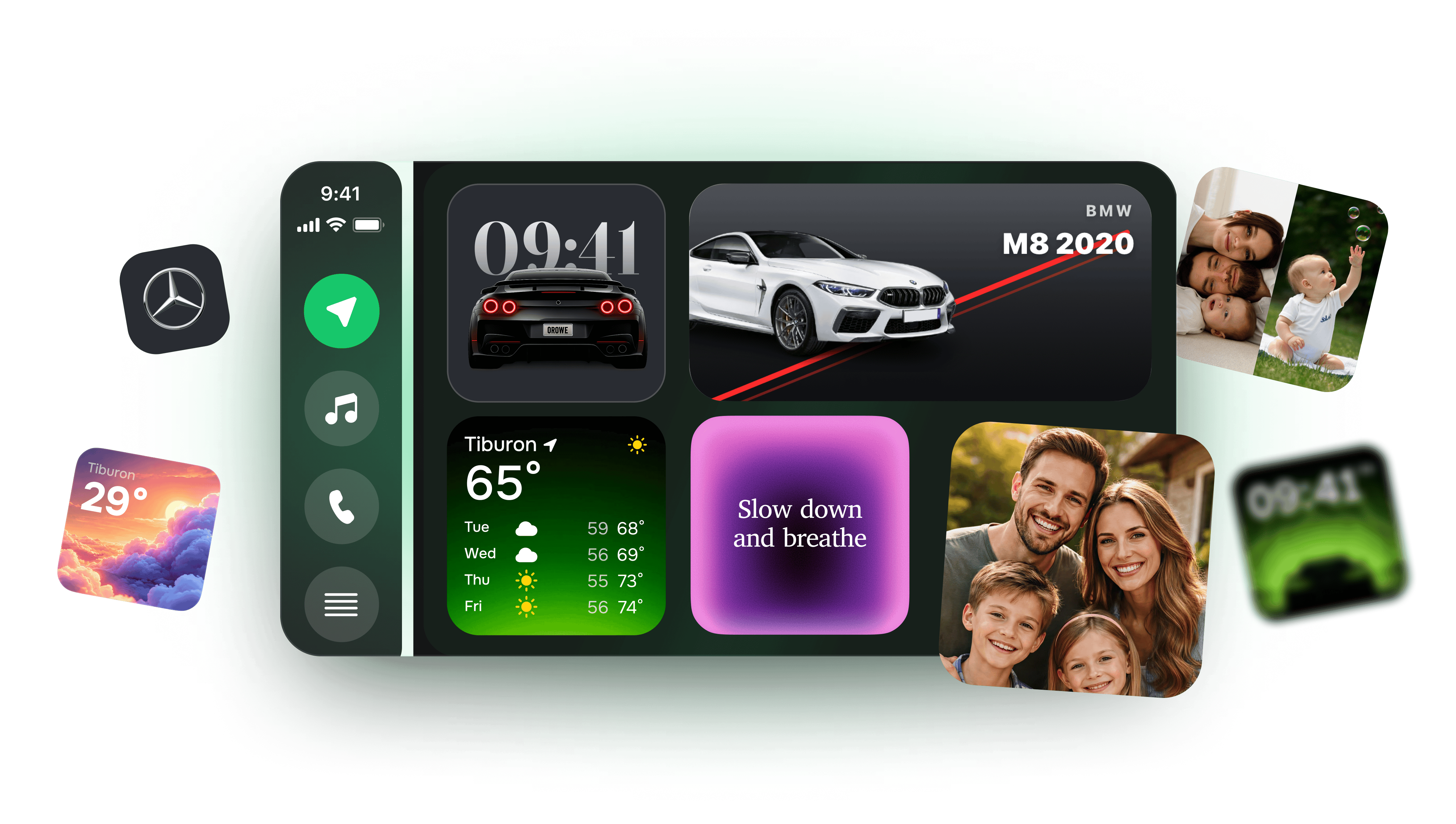
Explore the slots on the CarPlay widgets page, set a custom startup sound for the moment it connects — or, if your car can't take an adapter, see Mount Mode for the phone-as-dashboard route.
What the app adds to a wireless car
One sound on connect, 11 widgets while you drive, lyrics in sync.
Beyond going cable-free: photo, weather, clock, music and GPS-speedometer widgets on the iOS 26 CarPlay home screen, a custom startup chime, Musixmatch-synced lyrics, and Mount Mode for the cars a dongle can't help.
Car Play Connect: Auto Sync
Free
Frequently asked
Will a wireless CarPlay adapter work with my car?
It works with almost any car that already has wired CarPlay, because the car still sees plain wired CarPlay coming down the cable. The picker gives a per-car answer by make and year. The two cases where it won't help: a car with no CarPlay at all (there's nothing for the dongle to convert), and a car that already has factory wireless CarPlay (the adapter would just be a second thing to fail).
Do I even need a wireless CarPlay adapter?
Only if your car has wired CarPlay but no built-in wireless option. Plug your iPhone in with a cable: if CarPlay loads but there's no “Wireless CarPlay” choice in the car's menus, an adapter is the fix. If wireless is already there, pair that instead and save your money — which is exactly the case the picker flags as “Check first.”
What connector does my adapter need — USB-A or USB-C?
It depends on your car's data USB port. Older cars are almost always USB-A (the flat rectangular plug); many 2021-and-newer cars use USB-C. In practice it rarely matters, because every current adapter ships with both a USB-A and a USB-C tip. Just make sure you plug into the port that ran CarPlay in the cable test, not a charge-only port.
Does a wireless CarPlay adapter work in a Tesla?
No. Tesla head units don't run wired CarPlay, so a dongle has nothing to plug into. The same is true for Rivian and Lucid. For those cars the working route is a phone-as-dashboard setup — mount your iPhone and run a CarPlay-style layout with Mount Mode — or an aftermarket second screen.
Will an adapter add CarPlay to a car that doesn't have it?
No — that's the single most common misconception. A wireless adapter converts existing wired CarPlay to wireless; it can't create CarPlay from nothing. If no USB port loads CarPlay with a cable, you need a replacement head unit (for cars with a removable radio) or Mount Mode (for locked-in screens like most EVs).
Other tools you can run right here.
CarPlay compatibility checker
Pick your make and year — get a plain yes/no on CarPlay, whether it's wired or wireless, and what to do if it isn't supported.
Dashboard warning light identifier
Match the shape and colour of a dashboard symbol to the standard warning light it maps to, plus how urgent it is and what to do now.
CarPlay startup sound maker
Upload a clip, trim it to the 5-second import limit, normalise and download a ready-to-add CarPlay startup sound — all in your browser.
Speedometer calibration calculator
Enter stock and new tire sizes plus a dash reading — get real speed, percent error, a 30–90 lookup table, or a GPS-vs-dash correction factor.
The other things the app does.

CarPlay widgets for iOS 26
Car-brand logos, weather cards, clocks, photos, and air-quality tiles for the CarPlay home screen in iOS 26.

Custom CarPlay startup sound
Built-in presets across 7 packs, plus your own .m4a. Different sounds for connect and disconnect.
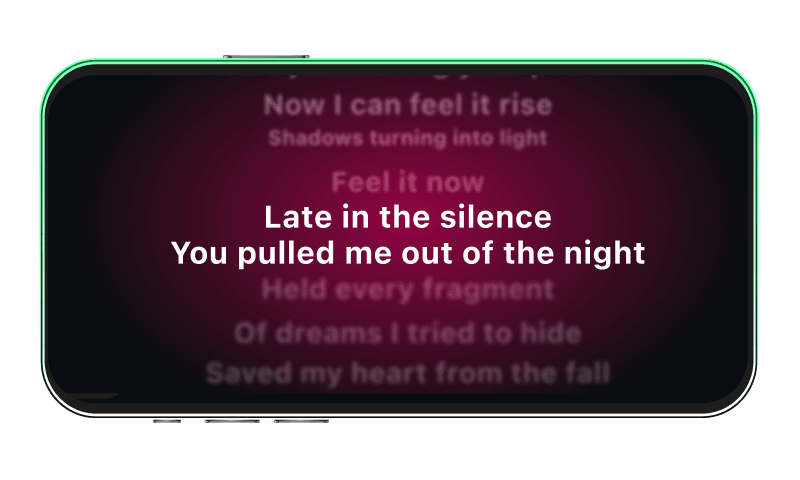
Synced CarPlay lyrics
Time-coded karaoke lyrics on the CarPlay display for Apple Music and Spotify. The active line highlights as the song plays.
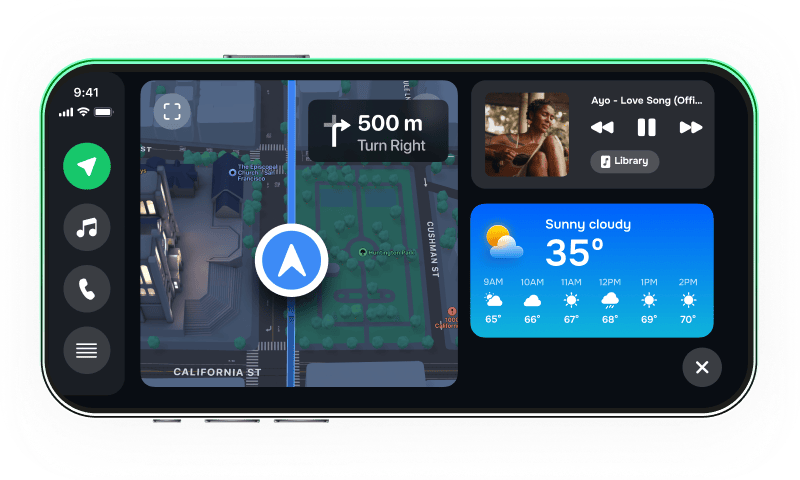
iPhone car dashboard
For Teslas, older cars, motorcycles — Mount Mode runs the dashboard on your iPhone when the car has no CarPlay.