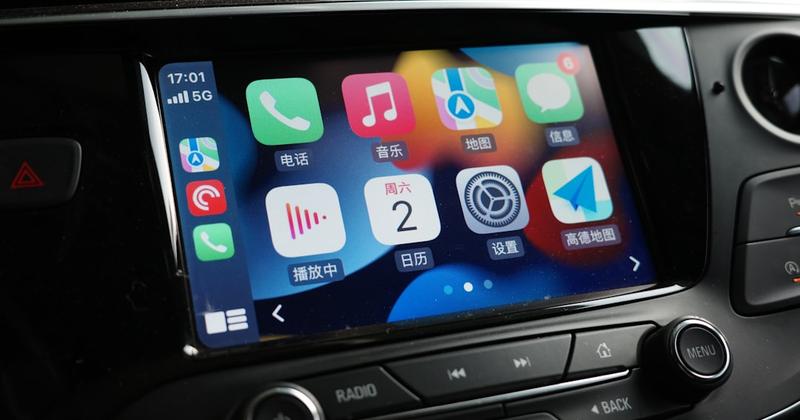
Add Car Widgets
On this page▾
- Next-generation CarPlay explained: the 2022 preview that became CarPlay Ultra
- What next-generation CarPlay actually changes
- Step 1: Check whether your car can get next-generation CarPlay
- Step 2: Update your iPhone and switch on iOS 26's new CarPlay
- Step 3: Add the widgets and personalization that shipped to every car
- Method 4: Get a next-gen dashboard on a car that can't get Ultra
- Next-generation CarPlay vs the CarPlay you have today
- Related guides
- Frequently Asked Questions
Quick answer
Next-generation CarPlay is the deeply integrated version Apple previewed at WWDC 2022. It shipped in May 2025 under a new name: CarPlay Ultra. It takes over every dashboard screen, including the instrument cluster, and needs carmaker hardware support — so it can't be added to a CarPlay car you already own.
If you've been waiting for the “next-generation CarPlay” Apple teased in 2022, here's the short story: it exists, it ships, and it goes by CarPlay Ultra now. I've run standard CarPlay for years across an iPhone 14 Pro and now an iPhone 16, in a Mazda CX-5 and a Ford with a Pioneer head unit. I don't drive an Aston Martin, so I'll be honest about the wall between what Ultra does on the few cars that have it and what the rest of us can switch on today.
Next-generation CarPlay explained: the 2022 preview that became CarPlay Ultra
Apple showed “the next generation of CarPlay” at WWDC in June 2022. The pitch was a version that reaches past the center screen into every display in the car — the instrument cluster, the gauges, the climate controls. It slipped for three years, then launched in May 2025 with a new retail name: CarPlay Ultra. Same project, different label.
So when you search “next-generation CarPlay,” you're looking for CarPlay Ultra. The two names describe one thing: the announcement name and the shipping name. For the full feature-by-feature breakdown, see CarPlay Ultra explained. Apple's own overview lives on the official CarPlay page.
| When | What happened |
|---|---|
| June 2022 | “Next-generation CarPlay” previewed at WWDC — an all-screens vision, no cars yet |
| 2023–2024 | First carmakers named (Aston Martin, Porsche), then repeated delays past the promised date |
| May 2025 | Ships as CarPlay Ultra in the Aston Martin DB12 and other 2025 models |
| 2025 (iOS 26) | Standard CarPlay gets its own modern refresh: a widget pane, Live Activities, and a tinted look |
What next-generation CarPlay actually changes
Regular CarPlay is one app on one screen. Next-generation CarPlay (Ultra) renders the whole cockpit in an Apple-designed layer that still keeps the automaker's branding. Here's what it adds:
- The full instrument cluster. Your speedometer, tachometer, and trip data render in Apple gauge layouts you can restyle from the iPhone.
- In-dash controls.Climate, heated seats, and radio live inside the CarPlay UI, so you don't drop out to the car's own system.
- Automaker look, kept.Start-up animations and drive-mode screens survive — Ultra blends them with Apple's layer instead of hiding them.
- Your iPhone apps and widgets. Ultra inherits the same apps, wallpaper, and iOS 26 widget stack that standard CarPlay already runs.
The honest catch: because gauges and climate run this deep, the car has to be built for it. Ultra is a hardware partnership, not a software update — which is exactly why you can't flash it onto a CarPlay car you already own.
The next-gen features you can get today
iOS 26 already brought widgets to every CarPlay car
You don't need Ultra hardware for a modern dashboard. Car Play Connect fills iOS 26's CarPlay widget slots with a GPS speedometer, album-locked Photos, and weather and trip stats — wired or wireless. Free to try.

Car Play Connect: Auto Sync
4.6·2,300+ ratings·Free to try

Step 1: Check whether your car can get next-generation CarPlay
Next-generation CarPlay only exists on cars that shipped with the hardware for it. There is no menu toggle and no dealer update that adds Ultra to an older car. So the first question is binary: is your exact model one of the handful that ships CarPlay Ultra?
- Check our running list of cars with CarPlay Ultra by make and model year.
- If your car isn't on it, it will run standardCarPlay only — still good, just not the all-screens version.
- Buying new and you want Ultra? Confirm it on the window sticker, not the brochure — availability often depends on trim and region.
When this won't settle it:a dealer may say a car “supports the latest CarPlay” and mean the iOS 26 refresh, not Ultra. Ask specifically whether the instrument cluster runs CarPlay.
Free browser tool
Not sure what CarPlay your car has? Check it
The compatibility checker tells you by make and year whether a car has regular CarPlay, wired or wireless — a quick way to rule Ultra in or out before you read further.
Open the CarPlay compatibility checker →Step 2: Update your iPhone and switch on iOS 26's new CarPlay
Whether or not you get Ultra, iOS 26 is where the “next generation” of standard CarPlay actually lives for most people. It adds the widget pane, Live Activities, and the tinted Liquid Glass look. Get it in two moves:
- On the iPhone, open Settings → General → Software Update and install iOS 26 or later.
- Connect to your car, then open Settings → General → CarPlay → your car to arrange the new widget pane and wallpaper.
When this won't work:a few older head units never got the iOS 26 CarPlay styling from the carmaker's side. The widgets still appear on the iPhone-driven pane, but the deeper tinting may not.
Step 3: Add the widgets and personalization that shipped to every car
This is the part people miss. The most useful “next-gen” upgrade — a customizable dashboard — isn't locked to Ultra. iOS 26 opened the CarPlay widget slots to every compatible car. You fill them from the iPhone:
- Pick widgets in Settings → General → CarPlay →your car → the widget pane.
- Add a GPS speedometer, album-locked Photos, weather, or trip stats with the best CarPlay widgets for daily driving.
- Rearrange the stack so your two most-glanced tiles sit up top.
The honest limit:widgets fill the right pane, not the instrument cluster. Only Ultra touches the gauges. But for most drivers, a good widget stack is 90% of what “next generation” feels like.
No Ultra in your future?
Get a next-gen-style dashboard on any car — even a Tesla
Car Play Connect's Mount Mode runs a CarPlay-style screen on a mounted iPhone: big maps, glanceable widgets, and a custom startup sound, on cars that will never get Ultra.
Car Play Connect: Auto Sync
Free to try
Method 4: Get a next-gen dashboard on a car that can't get Ultra
If your car will never get Ultra — it's too old, or it's a Tesla or Rivian that skips CarPlay entirely — you can still build a modern, glanceable dashboard. Two honest routes:
- Mount the phone. Car Play Connect's Mount Mode turns a mounted iPhone into a CarPlay-style screen: big maps, widgets, and audio over Bluetooth. No car support needed.
- Add wireless CarPlay to a wired car. A wireless CarPlay adapterwon't give you Ultra, but it does bring the standard iOS 26 experience to an older wired-only dash.
Neither one drives your gauges — that stays Ultra-only. But both get you the daily-use half of next-generation CarPlay without waiting years for your automaker.
Next-generation CarPlay vs the CarPlay you have today
“Next-generation CarPlay” splits into two very different things in 2026: the all-screens Ultra version on a few cars, and the iOS 26 refresh on every CarPlay car. Here's how they line up.
| Feature | Standard CarPlay (iOS 26) | Next-generation CarPlay (Ultra) |
|---|---|---|
| Screens it controls | Center display only | Every screen, cluster included |
| Instrument cluster | Car's own | Apple-designed, restylable |
| Widgets & personalization | Yes — iOS 26 widget pane | Yes — same widget pane |
| How you get it | Free iOS update | Only on cars built for it |
| Availability (2026) | Nearly every CarPlay car | A handful of luxury models |
Related guides
- CarPlay Ultra explained — the full feature deep dive on the shipping version.
- Cars with CarPlay Ultra — the running list by make and model year.
- When did CarPlay come out — the full dated timeline, from 2014 to Ultra.
- iOS 26 CarPlay widgets — the free next-gen upgrade you can switch on today.
- Which cars have Apple CarPlay — check standard CarPlay by brand and year.
Frequently Asked Questions
Is next-generation CarPlay the same as CarPlay Ultra?
Yes. Next-generation CarPlay is the name Apple used when it previewed the feature at WWDC 2022; CarPlay Ultra is the retail name it shipped under in May 2025. They describe one project — the deeply integrated version that takes over every dashboard screen. If a page still says “next-generation CarPlay,” it means Ultra.
Did next-generation CarPlay ever come out?
It did, after a three-year wait. Apple previewed it in June 2022, missed its original date, and finally launched it in May 2025 as CarPlay Ultra, starting with Aston Martin. It reaches real cars now, but only a small number of luxury models ship it in 2026. Standard CarPlay, meanwhile, got its own refresh in iOS 26.
Which cars have next-generation CarPlay?
Very few, as of 2026. Aston Martin was first, and a short list of other premium models has followed. Several brands that were once named as partners later backed out. See our cars with CarPlay Ultra list for the current names by make and model year, since it expands at luxury-car speed.
Can I add next-generation CarPlay to my car?
No. Next-generation CarPlay (Ultra) needs hardware the carmaker builds in, so there's no update, adapter, or app that adds it to an existing car. What you canadd is the iOS 26 widget dashboard on any CarPlay car, or a CarPlay-style screen through Car Play Connect's Mount Mode on a car without CarPlay at all.
When was next-generation CarPlay announced?
Apple announced next-generation CarPlay at WWDC on June 6, 2022, as a preview of an all-screens dashboard experience. No cars were available then. It took until May 2025 to ship, under the name CarPlay Ultra. For the full history from 2014 onward, see when CarPlay came out.