Add Car Widgets
On this page▾
- The 30-second version: which next-gen CarPlay can you get?
- What Apple's next-generation CarPlay actually is
- Which cars have Apple's next-generation CarPlay in 2026?
- Step 1: Check whether your car can run it
- Step 2: Switch on the next-gen features iOS 26 gave every car
- Step 3: Build a next-gen dashboard on a car that can't get Ultra
- Method 4: Add wireless next-gen CarPlay to an older wired car
- Apple's next-gen CarPlay vs the CarPlay you have today
- Related guides
- Frequently Asked Questions
Quick answer
Apple's next-generation CarPlay is the all-screens dashboard Apple previewed in 2022. It shipped in 2025–2026 under a new name, CarPlay Ultra, and it takes over every display in the car — the instrument cluster included. Only a few luxury models have it. But iOS 26 brought the widget half of it to nearly every CarPlay car, so most of the “next generation” is already free.
If a headline made you search “Apple next-generation CarPlay,” here's the honest state of it in 2026. It's real, it ships, and it goes by CarPlay Ultra. I've run standard CarPlay for years across an iPhone 14 Pro and now an iPhone 16, in a Mazda CX-5 and a Ford with a Pioneer head unit. I don't own an Aston Martin, so I'll be straight about the wall between what Ultra does on a handful of cars and what the rest of us can switch on today.
The 30-second version: which next-gen CarPlay can you get?
“Next-generation CarPlay” splits into two very different things, and which one you can get depends entirely on your car. Work out your bucket in 30 seconds:
- You bought a 2025-or-newer luxury car built for it.You may get the full CarPlay Ultra — the all-screens version. Check the model, then jump to Step 1.
- You have any other CarPlay car.You can't get Ultra, but iOS 26 already gave you the widget dashboard, the biggest day-to-day part of “next gen.” Go to Step 2.
- Your car has no CarPlay at all— a Tesla, a Rivian, or something older. You can still build a next-gen-style screen on a mounted iPhone. Go to Step 3.
The short truth: Apple's next-generation CarPlay is a hardware feature, not a download. No adapter or app adds Ultra to a car that shipped without it. What you canget on any car is the modern iOS 26 dashboard, and that's where most people should start.
Next-gen features on the car you own
Get the widget dashboard without waiting for Ultra
You don't need CarPlay Ultra hardware for a modern screen. Car Play Connect fills iOS 26's CarPlay widget slots with a GPS speedometer, album-locked Photos, and route-aware weather — wired or wireless, on the car you already drive. Free to try.

Car Play Connect: Auto Sync
4.6·2,300+ ratings·Free to try

What Apple's next-generation CarPlay actually is
Apple showed “the next generation of CarPlay” at WWDC in June 2022. The pitch was a version that reaches past the center screen into every display in the car — the instrument cluster, the gauges, the climate controls — while still keeping the automaker's own branding. It slipped for three years, then began shipping as CarPlay Ultra. Same project, retail name.
So when you search for Apple's next-generation CarPlay, you're really looking for CarPlay Ultra. For the full feature-by-feature breakdown, see CarPlay Ultra explained, and for how the 2022 name maps to today's, our next-generation CarPlay explainer walks the terminology. Apple announced the rollout on its official newsroom post.
Here's what the all-screens version adds over the CarPlay you already know:
- The instrument cluster. Your speedometer, tachometer, and trip data render in Apple gauge layouts you can restyle from the iPhone.
- In-dash controls.Climate, heated seats, and radio live inside the CarPlay UI, so you never drop out to the car's own system.
- The automaker look, kept.Start-up animations and drive-mode screens survive; Ultra blends them with Apple's layer instead of hiding them.
- Your iPhone apps and widgets. Ultra inherits the same apps and iOS 26 widget stack that standard CarPlay already runs.
Which cars have Apple's next-generation CarPlay in 2026?
Very few. Aston Martin was first to ship CarPlay Ultra, and the list has grown slowly since. Apple named more than a dozen partner brands back in 2022, but the rollout has been the story of who stayed in and who quietly walked away. Here's roughly where things stand:
| Where it stands (2026) | Examples |
|---|---|
| Shipping CarPlay Ultra now | Aston Martin (2025-and-newer models) |
| Named as a partner in 2022 | Hyundai, Kia, and Genesis, among others on Apple's original list |
| Reportedly stepped back | Several premium brands distanced themselves after the delays |
| No CarPlay of any kind | Tesla and Rivian — they build their own dashboards |
The list moves at luxury-car speed, so treat any single article as a snapshot. Our running list of cars with CarPlay Ultra tracks the confirmed names by make and model year, and the Tesla CarPlay status page covers the two big holdouts.
Step 1: Check whether your car can run it
Apple's next-generation CarPlay only exists on cars that shipped with the hardware for it. There's no menu toggle and no dealer update that adds Ultra to an older car. So the first question is binary: is your exact model one of the handful that ships CarPlay Ultra?
- Check the cars with CarPlay Ultra list by make and model year.
- If your car isn't on it, it runs standardCarPlay only — still good, just not the all-screens version.
- Buying new and set on Ultra? Confirm it on the window sticker, not the brochure — availability often depends on trim and region.
When this won't settle it:a salesperson may say a car “has the latest CarPlay” and mean the iOS 26 refresh, not Ultra. Ask specifically whether the instrument cluster runs CarPlay.
Free browser tool
Not sure what CarPlay your car has? Check it
The compatibility checker tells you by make and year whether a car has regular CarPlay, wired or wireless — a fast way to rule Ultra in or out before you read on.
Open the CarPlay compatibility checker →Step 2: Switch on the next-gen features iOS 26 gave every car
This is the part most people miss. The single most useful “next-gen” upgrade — a customizable widget dashboard — isn't locked to Ultra. iOS 26 opened the CarPlay widget slots to every compatible car, along with Live Activities on the CarPlay screen and a tinted look. Get it in two moves:
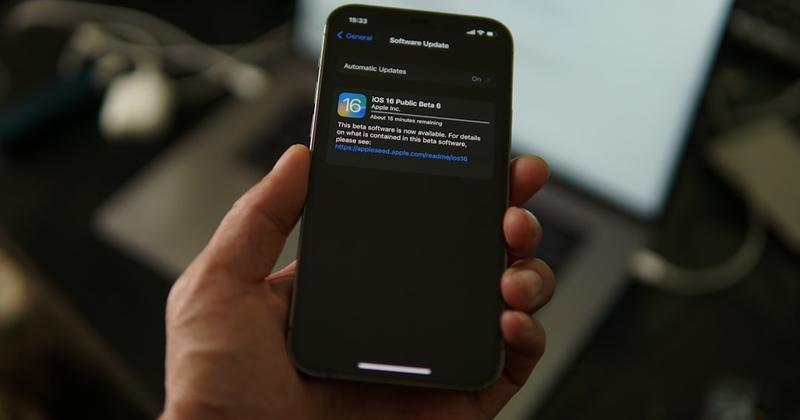
- On the iPhone, open Settings → General → Software Updateand install iOS 26 or later.
- Connect to your car, then open Settings → General → CarPlay → your car to arrange the widget pane and wallpaper.
Fill those slots with the tiles you actually glance at — a GPS speedometer, album-locked Photos, weather, or trip stats. Our pick of the best CarPlay widgetscovers what's worth a slot and what isn't.
The honest limit:widgets fill the right pane, not the instrument cluster. Only Ultra touches the gauges. But for most drivers, a good widget stack is 90% of what “next generation” feels like.
No Ultra in your future?
Build a next-gen dashboard on any car — even a Tesla
Car Play Connect's Mount Mode turns a mounted iPhone into a CarPlay-style screen: big maps, glanceable widgets, and a custom startup sound, on cars that will never get Ultra.
Car Play Connect: Auto Sync
Free to try
Step 3: Build a next-gen dashboard on a car that can't get Ultra
If your car will never get Ultra — it's too old, or it's a Tesla or Rivian that skips CarPlay entirely — you can still build a modern, glanceable dashboard. The cheapest screen is the iPhone itself: mount it and run a dashboard app.
- Put your iPhone in any car mount — vent, suction, or dash.
- Open Car Play Connect and switch on Mount Mode.
- Pick a layout: a large map, a GPS speedometer, and glanceable widgets for weather, music, and battery.
- Send audio to the car over Bluetooth, or add a custom CarPlay startup sound for the drive.
The honest limit:a mounted iPhone won't drive your car's gauges or steering-wheel buttons — that stays Ultra-only. But for the Teslas and older cars that can't run native CarPlay, it turns any mount into a real driver screen, and it's free to try.
Method 4: Add wireless next-gen CarPlay to an older wired car
There's a middle route people forget. If your car has wiredCarPlay but you want the modern wireless iOS 26 experience, a wireless adapter gets you there. It won't give you Ultra, but it does bring the standard next-gen CarPlay — widgets and all — to an older wired-only dash, cable-free.
- Confirm your car has factory wired CarPlay today.
- Buy a wireless CarPlay adapter — CarlinKit and Ottocast are the common brands.
- Plug it into the car's wired CarPlay USB port and pair your iPhone once over Bluetooth.
When this won't work: a charge-only cable or a media-only USB port stops the adapter from handshaking. Our tested adapter ranking covers which ones hold a stable link and which drop mid-drive.
Apple's next-gen CarPlay vs the CarPlay you have today
Here's how the all-screens Ultra version lines up against the iOS 26 refresh that reached nearly every CarPlay car — so you can see exactly which half you can get.
| Feature | Standard CarPlay (iOS 26) | Apple's next-gen CarPlay (Ultra) |
|---|---|---|
| Screens it controls | Center display only | Every screen, cluster included |
| Instrument cluster | Car's own | Apple-designed, restylable |
| Widgets & personalization | Yes — iOS 26 widget pane | Yes — same widget pane |
| How you get it | Free iOS update | Only on cars built for it |
| Availability (2026) | Nearly every CarPlay car | A handful of luxury models |
Related guides
- CarPlay Ultra explained — the full feature deep dive on the shipping version.
- Next-generation CarPlay — how the 2022 name maps to today's CarPlay Ultra.
- Cars with CarPlay Ultra — the running list by make and model year.
- iOS 26 CarPlay widgets — the free next-gen upgrade you can switch on today.
- Does Tesla have Apple CarPlay — the status of the biggest holdout.
Frequently Asked Questions
Is Apple's next-generation CarPlay the same as CarPlay Ultra?
Yes. Apple's next-generation CarPlay and CarPlay Ultra are the same project. Apple used the name “next-generation CarPlay” when it previewed the all-screens dashboard at WWDC 2022, then shipped it as CarPlay Ultra starting in 2025. If a headline still says “next-generation CarPlay,” it means Ultra — the version that takes over the whole cockpit.
Which cars have Apple's next-generation CarPlay?
Very few, as of 2026. Aston Martin was first to ship CarPlay Ultra, and a short list of premium models has followed. Apple named more than a dozen partners back in 2022, but several later stepped back. Check our running cars with CarPlay Ultra list for the current names, since it changes at luxury-car speed.
Can I add Apple's next-generation CarPlay to my current car?
No. Apple's next-generation CarPlay (Ultra) needs hardware the automaker builds in, so no update, adapter, or app adds it to a car that shipped without it. What you can add is the iOS 26 widget dashboard on any CarPlay car, or a CarPlay-style screen through Car Play Connect's Mount Mode on a car with no CarPlay at all.
When did Apple's next-generation CarPlay come out?
Apple previewed next-generation CarPlay at WWDC in June 2022, then shipped it in May 2025 as CarPlay Ultra, starting with Aston Martin. The rollout has stayed slow, so only a handful of luxury models offer it in 2026. Standard CarPlay, meanwhile, got its own modern refresh with iOS 26 on nearly every CarPlay car.
Do I need CarPlay Ultra to get next-generation features?
No. You don't need CarPlay Ultra for most of the next-generation feel. iOS 26 brought the widget pane, Live Activities, and a tinted look to standard CarPlay on nearly every compatible car. Ultra adds the instrument-cluster and climate takeover, but for daily driving a good widget stack covers most of what “next generation” means.
Does Apple's next-generation CarPlay work on Tesla?
No. No Tesla runs Apple's next-generation CarPlay, and none runs regular CarPlay either. Tesla builds its own dashboard and hasn't shipped CarPlay of any kind. The workaround is to mount an iPhone and run a CarPlay-style screen with an app such as Car Play Connect's Mount Mode. See our Tesla CarPlay guide for the details.