Add Car Widgets
On this page▾
- The 30-second test
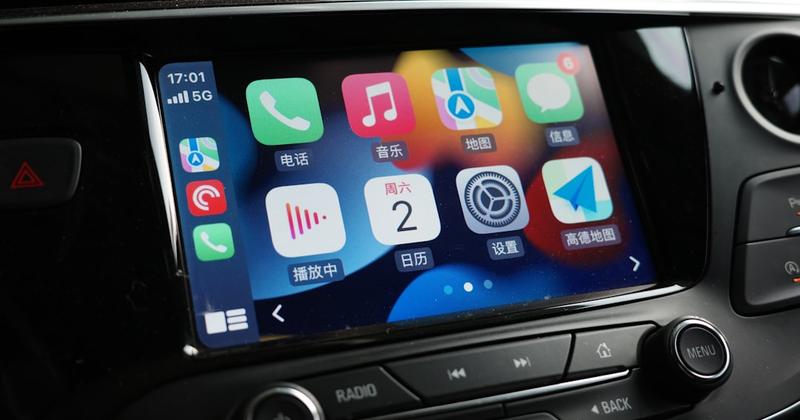
- Method 1: Check your Accord's touchscreen for the CarPlay icon
- Method 2: Confirm whether your Accord supports wireless CarPlay
- Method 3: Connect your iPhone the first time
- Method 4: Customize the CarPlay home screen
- Method 5: Fix CarPlay that won't connect or keeps dropping
- Honda Accord CarPlay options compared
- Frequently Asked Questions
- Related guides
Yes — most Honda Accords from recent model years have Apple CarPlay built in, standard on most trims, through the car's touchscreen. The exact cutoff depends on your specific model year, since Honda phased the feature in over time. Check your own Accord's screen for a CarPlay icon, or ask a Honda dealer with your VIN to confirm your exact year.
We build a CarPlay app, so we spend more time tracking how different automakers roll out CarPlay than most owners ever need to. Honda's rollout followed a familiar pattern: newer Accords got the feature standard, while older model years picked it up more unevenly. That gap is why two Accords parked side by side can show two different screens, even with the same badge on the trunk.
The 30-second test
Park first. Wake the Accord's touchscreen and look at the home screen before you touch a cable.
- CarPlay icon is there — plug in a data-capable USB cable. If a session starts, skip ahead to Method 3.
- You see a touchscreen, but no icon — your Accord may be an older model year that didn't get CarPlay. Move to Method 2 to double-check wireless, then confirm with a dealer.
- No touchscreen at all — your Accord predates CarPlay entirely. Mount Mode turns the iPhone itself into a dashboard instead.
Apple describes CarPlay as your iPhone's maps, calls, messages, and music on the car's own display. An Accord only offers that once its touchscreen was built, or updated, to support it — no adapter creates the feature on a screen that never had it.
Build your CarPlay
Got CarPlay? Add widgets before you drive off.
Car Play Connect brings weather, clock, and battery widgets to your Accord's CarPlay screen, plus a custom connect sound. Free to try; the annual plan is $19.99/year.

Car Play Connect: Auto Sync
4.6·2,735+ ratings·Free


Method 1: Check your Accord's touchscreen for the CarPlay icon
This costs nothing and tells you the truth right away. Do this parked, not while driving.
- Wake the center touchscreen and look at the home row for a CarPlay icon.
- Unlock the iPhone and leave it on the lock screen so you can watch for the connection prompt as soon as it appears.
- Plug a data-capable cable into the Accord's USB port. If CarPlay was already on the car, it should load within a few seconds.
When this doesn't work: there's no touchscreen at all, or you're not sure which model year you actually have. A Honda dealer can run your VIN and settle both questions at once.
Method 2: Confirm whether your Accord supports wireless CarPlay
Skip this step if your Accord only has a wired connection. Not every model year or trim adds wireless pairing on top of it.
Open your Accord's connectivity or phone settings and look for a wireless CarPlay toggle. Turn on Bluetooth and Wi-Fi on the iPhone first, since the car can't offer a wireless pair without them. If you don't see the option, plug in a cable instead — wired CarPlay works on every Accord that has the feature at all. Apple keeps its own list of CarPlay-compatible vehicles for checking a specific model before you buy.
When this doesn't work: the screen shows a wireless toggle but pairing never finishes. Turn Bluetooth off and back on the iPhone, then try again with the car parked.
Method 3: Connect your iPhone the first time
Wired is the path that works on every Accord with CarPlay, wireless or not.
- Unlock the iPhone and keep it on the lock screen or Home.
- Plug a data-capable cable into the Accord's USB port and wait up to 15 seconds.
- Tap Allow on the iPhone's trust prompt if one appears.
- Hold the voice-command button on the steering wheel once the icons load if you want Siri.
When this doesn't work: nothing happens after 15 seconds. Move to Method 5 before assuming your Accord lacks the feature.
Build your CarPlay
Add a connect chime after the pair succeeds
Car Play Connect plays a custom sound when CarPlay connects — built-in presets or your own file. Set it in the driveway, not at a light.
Car Play Connect: Auto Sync
Free
Method 4: Customize the CarPlay home screen
Native controls live on the iPhone, not in a hidden Accord submenu. Open Settings → General → CarPlay, tap the Accord, then Customize to reorder or remove apps.
On iOS 26, widgets can sit on the CarPlay screen through Settings → CarPlay → Customize → Widgets, added per car. Car Play Connect ships a gallery built for that row: styled weather cards, date and time clocks, air quality, iPhone battery, year progress, your own photos, an AI Photo Widget, a MyCard car portrait, car-brand logos, affirmations, faith verses, football crests, and country flags. Each type is customizable — background color, your photos, day or night theme.
Want a different connect sound than Apple's 2014 default? Open the app, go to Sounds → Connect Sound, and pick a preset or import a short .m4a, .mp3, or .wav up to 5 seconds long. The startup-sound walkthrough covers the five parked steps. Dynamic Lyrics can ride in the widget stack when you play a time-coded track on Apple Music or Spotify — the CarPlay lyrics app guide walks through picking one.
Set this up in the driveway. The Accord's center screen is still your phone, and reaching for it in traffic is still phone use.
Method 5: Fix CarPlay that won't connect or keeps dropping
Work through these in order. Stop as soon as the icons appear — jumping around hides the simple fix.
- Bad cable — swap in a different cable. A charge-only lead is the single most common reason CarPlay never starts.
- Wrong USB port — some Accords have more than one port, and not every port carries data.
- No Allow tap — unlock the phone. A missed trust prompt sits quietly in the notification shade.
- Forget the car — Settings → General → CarPlay → the Accord → Forget This Car, then pair again.
- Pending iOS update — an older iOS version can behave oddly against an older infotainment build.
- Wireless leftovers — toggle Bluetooth off, wait 10 seconds, then pair once more.
Still blank? Turn the car off, open the driver door, wait 30 seconds, and start again. Then try wired even on a wireless-capable Accord, since it's the more reliable fallback.
Honda Accord CarPlay options compared
Use this as a parked cheat sheet. Pick the row that matches what your own screen already showed you.
| Option | What you need | Good for |
|---|---|---|
| Screen check (Method 1) | A parked Accord and a data cable | Confirming CarPlay is on your car for free |
| Wireless CarPlay (Method 2) | Bluetooth and Wi-Fi on, plus a supported model year | Skipping the cable on later drives |
| Wired connection (Method 3) | A data-capable USB cable | The most reliable first connection |
| Widgets and sounds (Method 4) | Car Play Connect on the iPhone | Making the CarPlay screen your own |
| Mount Mode (fallback) | An iPhone, a mount, and Car Play Connect | An older Accord with no CarPlay screen at all |
Frequently Asked Questions
Does the Honda Accord have Apple CarPlay?
Yes, most Honda Accords from recent model years come with Apple CarPlay built in, standard on most trims. Honda phased the feature in gradually, so an older Accord may not have it at all, and the earliest model years predate CarPlay entirely. Check your own screen for a CarPlay icon, or ask a Honda dealer with your VIN to confirm your exact year.
Which Honda Accord years have Apple CarPlay?
It depends on your specific model year and trim, since Honda rolled the feature out over several years rather than all at once. Newer Accords include it standard across most trims. An older Accord may not have it at all. A Honda dealer can confirm the exact cutoff for your VIN.
Does the Honda Accord support wireless Apple CarPlay?
Some recent Accords support wireless CarPlay, pairing over Bluetooth and Wi-Fi instead of a cable, but that isn't true of every model year or trim. Check your Accord's connectivity settings for a wireless CarPlay option. Plugging in a cable first is the surest test, since wired CarPlay works on every Accord that has the feature at all.
How do I enable Siri for CarPlay in my Accord?
Siri doesn't have a separate Accord-specific switch. Turn it on for the iPhone itself under Settings → Siri & Search, then press and hold the voice-command button on the Accord's steering wheel to talk to it through CarPlay. If holding the button does nothing, confirm CarPlay is already connected before assuming Siri is broken.
How do I turn off or disconnect CarPlay in my Accord?
Unplug the USB cable, or turn off the ignition, and the CarPlay session ends right away. If you connected wirelessly, turn off Bluetooth or Wi-Fi on the iPhone, or open Settings → General → CarPlay on the phone, select the Accord, and choose Forget This Car. There's no separate CarPlay app to close, since it runs as part of the connection.
When did Apple CarPlay come out?
Apple introduced CarPlay in 2014, years before most automakers, including Honda, built it into their own infotainment systems. Honda's own rollout followed later and reached different Accord model years at different times. That gap is why two Accords of different model years can behave differently today.
Related guides
- CarPlay widgets — build a weather, clock, and battery widget set for the CarPlay screen once it's connected.
- Mount Mode — a dashboard for an Accord, or any car, without a native CarPlay screen.
- Custom connect sound — give the Accord a different chime than the factory CarPlay default.
- Dynamic Lyrics — synced song lyrics on the CarPlay screen once a track is playing.
- More CarPlay guides — setup, troubleshooting, and customization for every CarPlay car.