Add Car Widgets
On this page▾
- The 30-second test: is it wired or wireless?
- Match your symptom to the right fix
- Fix 1: Turn CarPlay back on in Screen Time
- Fix 2: Wired — get the cable and port right
- Fix 3: Wireless — pair over Bluetooth first
- Fix 4: Switch Siri on and allow CarPlay while locked
- Fix 5: Reset the pairing on both sides
- Frequently Asked Questions
Quick answer
Apple CarPlay usually won't connect because CarPlay is blocked in Screen Time, the cable is charge-only, or a wireless pairing is half-broken. Fix it in order: Settings → Screen Time → Content & Privacy Restrictions → Allowed Apps → turn CarPlay on. Then swap to an MFi data cable, or forget the car and re-pair wirelessly.
A common one: you plug in the iPhone, the car shows a grey screen or “CarPlay unavailable,” and nothing else happens. A connection that never starts has a different suspect list than one that drops mid-drive. If yours keeps cutting out after it connects, read why CarPlay keeps disconnecting instead. Never got it running in the first place? Start with how to connect CarPlay.
This guide is the fix order for both wired and wireless CarPlay. Start at the top and stop the moment CarPlay appears. Most people fix it at Fix 1 or Fix 2 and never reach the reset. Prefer to read this in Traditional Chinese? See CarPlay won't connect.
The 30-second test: is it wired or wireless?
Before you touch a setting, answer three quick questions. They tell you which fix to try first.
- Wired or wireless?If your car has a CarPlay USB port, you're wired. If it pairs over Bluetooth with no cable, you're wireless. The fixes differ.
- Does the phone charge when plugged in?If it charges but CarPlay stays dead, the cable carries power but not data — a classic charge-only lead.
- Does the car say “CarPlay unavailable” or show nothing? A named error points to a phone-side block (Fix 1). A blank port points to the cable or port (Fix 2).
Know the second it connects
Hear a custom chime the moment CarPlay finally links up
Car Play Connect plays your chosen startup sound every time CarPlay connects — an instant audible check while you cycle through these fixes, so you know which one actually took.

Car Play Connect: Auto Sync
4.6·2,735+ ratings·Free


Match your symptom to the right fix
The five fixes, ordered by how often each one is the real cause of a no-connect:
| # | Fix | Symptom it solves | Type |
|---|---|---|---|
| 1 | Turn CarPlay on in Screen Time | “CarPlay unavailable” or the car never offers it | Phone |
| 2 | Swap to a short MFi data cable | Phone charges but nothing shows | Wired |
| 3 | Pair over Bluetooth, then forget & re-pair | Wireless car never finds the phone | Wireless |
| 4 | Enable Siri + allow CarPlay while locked | Setup starts, then stalls | Phone |
| 5 | Reset the pairing on both sides | Used to work, now refuses | Both |
Fix 1: Turn CarPlay back on in Screen Time
This is the fix almost everyone misses. Screen Time can hide CarPlay entirely, so the car acts like the feature was never installed. An iOS update or a handed-down phone often flips it off.
On your iPhone: Settings → Screen Time → Content & Privacy Restrictions → Allowed Apps (older iOS: Allowed Apps & Features) → make sure CarPlayis switched on. If Content & Privacy Restrictions is off, this isn't your problem — move to Fix 2.
When it won't work: if CarPlay is already on here and the car still shows nothing, the block is elsewhere. Run the CarPlay diagnostic flowchart to isolate cable, port, or car-side faults.
Fix 2: Wired — get the cable and port right
Wired CarPlay needs a data cable in the data port. Two things break it: a charge-only cable and the wrong USB socket. Cars often have several USB ports and only one carries CarPlay.
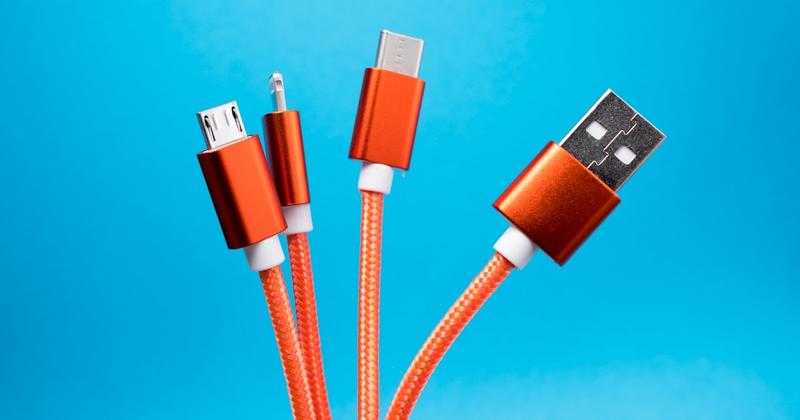
- Use an MFi-certified cable under one meter. Cheap or worn cables lose the data pairs first, so the phone charges while CarPlay stays blank.
- Find the CarPlay port. Look for the port with a phone or CarPlay icon. Skip hubs, rear-seat ports, and any adapter in the chain.
- Clean the iPhone port. Lint packs into the connector and blocks the data pins. A gentle scrape with a wooden toothpick clears it.
Still charging but dead? Walk the full cable test in the wired CarPlay not working guide. Apple lists the official steps too, in Apple's Set up CarPlay support page.
Once it connects
Make the screen worth the fight
GPS speedometer, weather, and synced lyrics as CarPlay widgets — Car Play Connect sets them up in about a minute after your connection holds.
Car Play Connect: Auto Sync
Free
Fix 3: Wireless — pair over Bluetooth first
Wireless CarPlay starts as a Bluetooth handshake, then hands off to a 5 GHz Wi-Fi link. If the car never finds your phone, the Bluetooth half never completed.
On the iPhone, turn on both Bluetooth and Wi-Fi — wireless CarPlay needs both, even though you never join a network. Put the car in its Bluetooth pairing mode (usually Settings → Phone or Add Device on the head unit), then accept the pairing code on both screens. Give the first link a full minute; the initial negotiation is the slowest one.
If it pairs but won't hand off, forget the car in Settings → General → CarPlayandin Settings → Bluetooth, then start over. Using a plug-in adapter rather than built-in wireless? Update its firmware — our wireless adapter ranking tracks which brands fixed their pairing bugs.
Fix 4: Switch Siri on and allow CarPlay while locked
CarPlay depends on Siri. If Siri is fully off, setup can start and then stall with no error. Turn it back on and CarPlay often connects on the next plug-in.
On the iPhone: Settings → Siri (or Apple Intelligence & Siri) → turn on Listen for Sirior Press Side Button for Siri. Then Settings → Face ID & Passcode → scroll to Allow Access When Locked and switch CarPlay on, so a locked phone can still start a session.
When it won't work: if Siri was already on, this isn't your cause. See CarPlay unavailable, enable Siri for the edge cases where the Siri prompt itself is the blocker.
Fix 5: Reset the pairing on both sides
Save this for a car where CarPlay used to work and now refuses. A reset clears a corrupted pairing record, but it also wipes a good one — so don't start here.
Forget the car on the iPhone (Settings → General → CarPlay → your car → Forget This Car) anddelete the phone from the car's Bluetooth list. Reboot both, then pair fresh. The full step-by-step, including the deeper network reset, lives in how to reset CarPlay. Setting up in a brand-new car for the first time? Start with how to set up Apple CarPlay instead.
Frequently Asked Questions
Why is my Apple CarPlay not connecting?
The most common reason is a Screen Time block: Settings → Screen Time → Content & Privacy Restrictions → Allowed Apps, with CarPlay switched off. After that it's a charge-only cable on wired cars, or a half-broken Bluetooth pairing on wireless cars. Work the fixes in order and stop when CarPlay appears.
Why won't CarPlay connect wirelessly?
Wireless CarPlay needs both Bluetooth and Wi-Fi switched on, even though you never join a network. If the car can't find your phone, the Bluetooth handshake never finished. Forget the car in both CarPlay and Bluetooth settings, reboot both sides, and pair again from the car's Add Device menu.
Does CarPlay need Siri to be on?
Yes. CarPlay relies on Siri, so a fully disabled Siri can stop a connection from completing. Turn Siri back on in Settings → Siri, then plug in or re-pair. This is a frequent cause when setup starts and then quietly stalls with no error message.
Why does my phone charge but CarPlay won't connect?
Charging uses two wires; CarPlay data uses the rest. A worn or charge-only cable loses the data pairs first, so the phone powers up while CarPlay stays blank. Swap to a short MFi-certified data cable before anything else — it's the single most common wired cause.
How do I reset CarPlay when it won't connect?
Forget the car on the iPhone (Settings → General → CarPlay → Forget This Car) and delete the phone from the car's Bluetooth list, then reboot both and pair fresh. Reset only when CarPlay used to work and now refuses — it clears a corrupted pairing but also wipes a good one.
Is CarPlay not connecting fixed differently in the UK?
No. CarPlay not connecting has the same fix order in the UK as anywhere — your iPhone and car don't change behaviour by region. Start with the Screen Time block, then the cable, then the wireless pairing. If you're unsure your car even supports it, Apple's UK help page lists the models at support.apple.com/en-gb/105109.